.svg)
Mar 26, 2026
ClickUp Client Portal: Why It Falls Short (+ What to Use Instead)
By
Sam Chlebowski
.avif)
A lot of teams try to turn ClickUp into a client portal.
On paper, it makes sense. You already use it to manage work, so why not bring clients into the same system?
The problem is it wasn’t built for that. ❌
While it works well for internal project management, using it as a client portal often creates friction in places you don’t expect, from onboarding to feedback to day-to-day collaboration.
In this article, we’ll take a closer look at why ClickUp struggles as a client portal and what teams should be using instead.
Does ClickUp Have a Client Portal?

Short answer: not really. But you can build one.
Because ClickUp is so customizable, teams often piece together a “client portal” using existing features. It’s not one defined setup, but usually a combination of things like:
- Inviting clients as guests to specific folders or task lists
- Sharing dashboards for a high-level view of progress
- Sending public docs with updates or embedded task views
Depending on how it’s set up, this can look like a client portal on the surface. For example, clients can get access to project updates, tasks, and files in one place.
But structurally, nothing has changed.
There’s no separate client-facing system, no built-in flow guiding them through what to do next, and no default experience designed specifically for external users.
Everything depends on how well you’ve set it up.
That means:
- You have to manually decide what to show (and what to hide)
- You have to manage access at every level
- You have to maintain the setup as projects and clients change
So yes, ClickUp can be used like a client portal. But it isn’t one by design.
It’s a workaround built on top of a tool meant for internal project management.
Why Tools Like ClickUp Were Never Built to Be Client Portals

Client portals are designed to do three things well:
- Collect information from clients (files, feedback, approvals)
- Keep communication structured and easy to follow
- Guide clients through what they need to do next
That’s what makes onboarding and ongoing work scalable.
ClickUp isn’t built around those goals.
It’s built for internal teams to manage tasks, organize projects, and collaborate with each other. And while it’s flexible enough to simulate a client portal, that flexibility is exactly why teams end up stitching together their own systems.
Here’s how most teams attempt to use ClickUp as a client portal:
Option 1: Inviting clients as guests

This is the most common setup.
You invite clients into ClickUp as guests and give them access to specific folders, lists, or tasks. From there, they can view progress, leave comments, and upload files.
On the surface, this feels like a collaborative portal. Everything lives in one place, and clients can interact with the work.
But what you’re really doing is placing clients inside your internal workspace.
That means you have to:
❌ Manually control what they can and can’t see
❌ Clean up views so they’re not confusing
❌ Avoid exposing internal notes or processes
There’s no separation between “team view” and “client view” - just restricted access.
And as you add more clients, this setup becomes harder to maintain.
Option 2: Sharing dashboards for visibility

Some teams avoid that complexity by using dashboards instead.
Dashboards give clients a high-level view of what’s happening without exposing the full workspace.
This works well if your goal is simply to keep clients informed.
But dashboards are passive. They show information, but they don’t guide action.
There’s no built-in way for clients to:
❌ Complete tasks
❌ Submit required information
❌ Move through a clear process
Teams often end up relying on email or other tools to handle the actual back-and-forth.
Option 3: Using docs or shared links

Another approach is to create a simplified experience using ClickUp Docs or shared views.
You might include a welcome message, embed a task list, and share it via a public link so clients don’t need to log in.
This can feel cleaner and more client-friendly, especially for simple projects or one-off updates.
But it comes with trade-offs.
❌ Clients can view what’s happening, but there’s no system guiding them through what to do next or holding them accountable for completing tasks.
It ends up functioning more like a static project page than an active client portal.
🔗 If you want to learn more about ClickUp portals, here’s a guide on how to create a client portal in ClickUp.
Summary: Where ClickUp Client Portals Fall Short vs LaunchBay
Why ClickUp Portals Don't Work for Fast-Moving Agencies and Software Companies
ClickUp can work as a client portal when you have a few clients and simple workflows.
But agencies and SaaS teams don’t operate in that environment. They rely on fast feedback loops, clear ownership of tasks, and structured onboarding.
1. It’s built primarily for internal teams ❌
ClickUp is designed for managing internal work, not delivering a client-facing experience.
That shows up in how everything is structured. Spaces, folders, and lists are meant to organize internal workflows, and tasks are built for execution and tracking. Permissions sit on top of that system to control who can see what.
When you use ClickUp as a client portal, you’re ultimately giving clients access to a controlled version of your workspace.
To make that usable, teams usually have to step in and reshape things.
That might mean simplifying views, renaming items so they make sense externally, or making sure internal context doesn’t accidentally show up in shared areas. In some cases, it even means restructuring how work is organized just so it’s clearer for the client.
The result? More ongoing effort just to keep the experience usable. Instead of the tool handling the client-facing layer, your team becomes responsible for maintaining it. Over time, that adds operational overhead and makes ClickUp a less efficient choice for managing client-facing work.
2. It puts more work on your clients ❌
For clients to fully participate, they need to accept an invite, create an account, and log in to access their workspace.
From there, they’re expected to understand how to navigate tasks, comments, and views.
For some clients, that’s fine. But for many, especially those who aren’t used to project management tools, it creates friction early on.
❗ Note: There is a loginless option using public docs or shared views, but those are mostly limited to viewing. Clients can see updates, but they can’t meaningfully interact with tasks or move things forward within the platform.
So you end up with a trade-off. You can make access easier, or you can make the portal functional.
The result? More follow-ups, more clarifications, and more work happening outside the platform.
3. It lacks true white-labeling ❌
ClickUp offers basic branding, but full white-labeling is limited to enterprise plans.
Otherwise, you can’t fully shape the experience around your own process or brand. Instead, you’re working within ClickUp’s interface.
For agencies and SaaS companies, this matters. The client portal is part of how your service is delivered.
It’s where clients interact with your work, share information, and form an impression of how organized and seamless your process feels. When that experience is tied to a generic tool interface, it’s harder to make it feel fully polished or aligned with your brand.
The result? Your process is shaped by the tool, rather than the other way around. Over time, that limits how much you can refine or differentiate your client experience.
🔗 Related article: The Ultimate Guide to B2B Client Onboarding
Why Software Companies Shouldn’t Use ClickUp as a Client Portal
For software companies, the biggest issue is simple: ClickUp sits outside your product.
Onboarding, implementation, and customer success should feel like a natural extension of your product experience. But when you use ClickUp as a client portal, you split that journey across two tools.
Customers now have to learn your product and navigate ClickUp.
That added layer creates friction and slows down adoption.
ClickUp also doesn’t guide users through a clear, product-focused journey. It shows tasks, but it doesn’t connect those tasks to outcomes inside your product.
So instead of reinforcing how your product works, it pulls attention away from it.
Your portal should drive product adoption, not compete with it.
Why Agencies Shouldn’t Use ClickUp as a Client Portal
For agencies, the biggest issue is how ClickUp affects client interaction.
Agency work depends on fast feedback, approvals, and clear communication. But ClickUp isn’t designed around those interactions.
That means clients have to adapt to your system instead of being guided through a simple process. They need to figure out where to leave feedback, what’s expected of them, and how to stay on top of updates.
As a result, communication often drifts outside the platform. Feedback comes through email, messages, or calls, and your team ends up managing conversations in multiple places. And your inbox shouldn’t be a client management system.
There’s also the operational side.
As you take on more clients, you have to maintain separate setups, manage permissions, and keep everything organized. What starts as manageable quickly turns into ongoing overhead.
Your portal should reduce back-and-forth and make collaboration easier.
🔗 Related article: How to Improve Your Client Onboarding Process
What a Real Client Portal Needs to Support
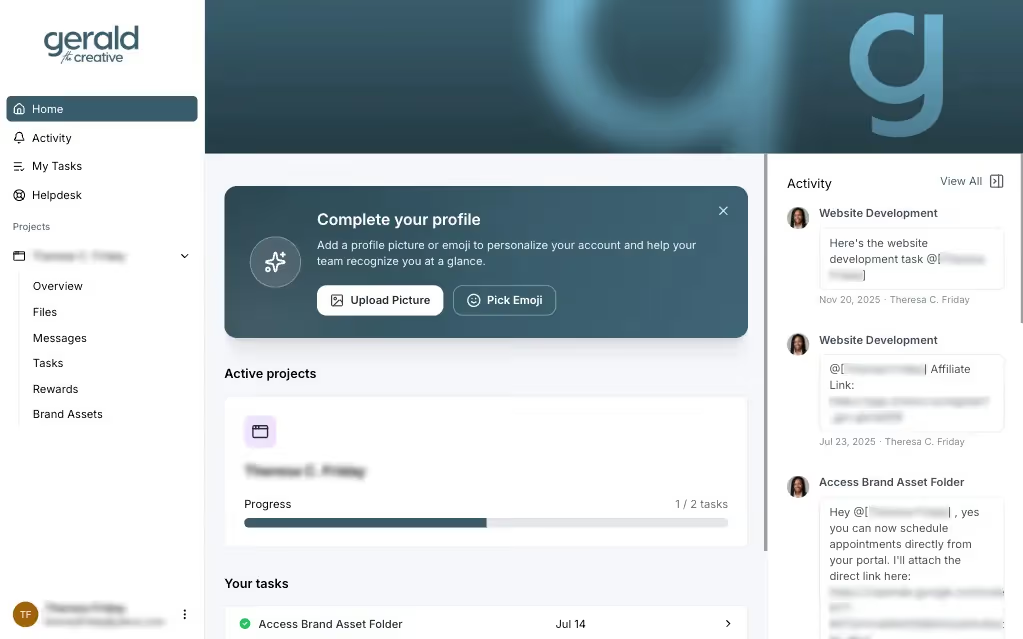
By now, you’ve seen why ClickUp falls short as a client portal.
👉 So the real question is: what should you use instead?
A real client portal isn’t something you piece together from internal tools. It’s purpose-built to manage how clients interact with your work
That typically includes things like:
- Guiding clients through clear steps and milestones
Instead of exposing tasks, the portal should show clients exactly what to do next and in what order - something ClickUp doesn’t natively handle. - Collecting files, forms, and inputs in a structured way
Everything should be submitted in one place, at the right time, without relying on scattered comments, attachments, or external tools. - Keeping clients accountable without manual follow-ups
Built-in reminders and prompts should keep projects moving, rather than relying on your team to chase responses. - Reducing friction for clients to participate
Clients should be able to access their portal and take action easily, without needing to learn a complex system or manage another account. - Supporting both internal workflows and client-facing experiences
Your team and your clients shouldn’t be using the same interface. The portal should separate the two while keeping everything connected. - Providing a fully branded, client-facing environment
The experience should feel like an extension of your business, not a third-party tool with limited customization.
LaunchBay is built specifically for that purpose. It brings client tasks, communication, and data collection into one structured system, so everything happens in the same place instead of being scattered across tools.
Clients aren’t just viewing updates; they’re completing tasks, uploading files, signing documents, and moving projects forward inside the portal itself.
Plus it’s fully branded and loginless, so clients can access it instantly and interact with your process without learning a new tool or creating an account.
That’s the difference between adapting a project management tool and using a platform designed for client-facing workflows.
Bonus: If you’d still rather use ClickUp internally, you don’t have to replace it. LaunchBay integrates with ClickUp through tools like Zapier, so client-side actions, like completed tasks, can automatically update your internal ClickUp workspace.
Onboard Smarter and Scale Faster with LaunchBay
If you’re serious about scaling onboarding, shared workspaces and manual processes won’t cut it.
You need a platform designed to manage the entire client experience from start to finish.
LaunchBay is a client onboarding software built specifically for B2B software and service businesses. It helps you replace scattered emails, spreadsheets, and manual follow-ups with one centralized workspace—automating the busywork so your team can focus on delivering value.
Here’s why B2B teams choose LaunchBay:
✅ Centralized client experience — keep all files, forms, and messages in one branded portal.
✅ Built for both clients and internal teams — clearly manage client-owned tasks alongside internal work in a single system.
✅ Automated follow-ups & reminders — never chase a client for missing info again.
✅ Templates for repeatable success — standardize your workflows while personalizing the client experience.
✅ Real-time visibility — see exactly where every client stands and where delays occur.
✅ White-labeled & secure — your brand stays front and center, with enterprise-grade protection.
Ready to fix your B2B client onboarding?


Take command of every customer onboarding.
One platform to run, monitor, and manage every customer onboarding, with full visibility into every account.
Ready to stop wondering where things stand?