.svg)


Looking for the best
Rocketlane alternative?
Stop fighting Rocketlane’s complexity and start delivering fast, frictionless onboarding with a platform built for clarity, speed, and scale.
Why do users prefer LaunchBay?
40+
hours saved
per week with reusable workflows and templates.
83%
faster onboarding
with automated contract, forms, and file collection.
2x
new client capacity
by streamlining onboarding, updates, and communication.
72%
fewer follow-ups
with automated client reminders and real-time project tracking.
TRUSTED BY 1000+ CUSTOMER ONBOARDING & OPERATIONS LEADERS AT TOP B2B COMPANIES
.avif)


.avif)

.avif)

.svg)






“Before LaunchBay, we would spend over four hours per client tracking down onboarding information. Now, that entire process takes just 15 minutes—freeing up our team to focus on delivering value instead of chasing clients.”
Rocketlane customers are switching to LaunchBay — here’s why
Client portals confuse clients and create extra work
Teams report broken portal elements, limited client permissions, and no easy way to re-send invites. Clients often face too many redundant views—creating unnecessary friction and increasing support workload.
Automations can’t adapt to existing workflows
Rocketlane automations must be configured globally, not per project or template. Users also note missing logs and poor visibility, making it hard to trust whether workflows ran or emails were sent.
Setup and management drains time and resources
Rocketlane’s highly configurable backend often means 2+ months of setup, and ongoing maintenance can require dedicated, hands-on support. Smaller teams can’t justify the time or staffing demands.
Tasks slow clients down instead of moving onboarding forward
Rocketlane tasks rely on simple text fields and attachments, lacking integrated actions like signing contracts, proofing designs, or embedding tools. This forces clients into external tools and creates missed to-dos and onboarding delays.

Sourced from verified G2 & Capterra reviews
Onboard smarter and scale faster with LaunchBay
Turn onboarding from chaotic to effortless
Launch customers faster, show value sooner, and deliver an experience clients actually enjoy. Fully branded, loginless portals remove friction and make it effortless for clients to complete tasks, track progress, and communicate with your team.
Automation you can trust — and feel good about
LaunchBay gives you clear, reliable automation logs so you always know what ran and when. Personalize every client’s workflow with dynamically populated tasks and portals that update themselves automatically, eliminating manual oversight.
Grow client volume without growing your team
Set up LaunchBay in hours—not months—and scale seamlessly. Automated onboarding playbooks handle client tasks, follow-ups, and workflows, freeing your team from busywork so they can support more clients without additional headcount.
Build action-ready onboarding checklists in minutes
Create fully automated, branded client checklists with tasks like contract signing, form submissions, file uploads, and payments. Everything triggers automatically when a deal closes, eliminating manual steps and accelerating time-to-value.
4 areas where LaunchBay dominates Rocketlane
Show value sooner and prevent churn before it starts

Eliminate confusion by giving clients a single, branded portal to complete tasks, view progress, and communicate with your team. Loginless portals automate the collection of forms, files, and contracts—helping you launch customers dramatically faster with less back-and-forth.

With an overwhelming number of views, boards, and custom elements, Rocketlane’s portals make it hard for clients to understand what’s done, what’s next, and where their project stands—creating friction, slowing launches, and increasing delays.
Build a scalable onboarding process in minutes, not months
Whether you’re switching from spreadsheets or another tool, LaunchBay makes setup painless. Use AI-powered builders to create automated onboarding workflows in minutes, then test them with simulated clients so you can launch in days—not months. Fast setup means faster time-to-value with zero technical lift.
Setup often requires two months or more to get fully configured and typically requires hands-on support from the Rocketlane team. This slows implementation, delays customer launches, and makes rapid iteration difficult.
Show clients exactly where they stand—no guesswork, no follow-up emails
In LaunchBay, every project includes a real-time progress tracker clients can access directly from their portal. As tasks are completed, the tracker updates automatically—eliminating guesswork and manual status checks. Both your team and your clients always know exactly what’s done, what’s next, and what’s blocking progress.
To support large enterprise teams, Rocketlane’s views and dashboards are highly configurable—but that complexity means even setting up basic client-facing progress tracking requires significant backend setup. This makes it harder for clients and teams to get the clear visibility they need.
Grow your customer base without adding operational overhead
LaunchBay sets up in hours—not months—and workflow updates or customization take just minutes. LaunchBay eliminates manual tasks, follow-ups, and busywork, and scales effortlessly as your customer base grows, so your team can support more clients without adding headcount.
Rocketlane’s templates work well—until a client needs something different. Adjustments can be slow and difficult, creating frustration, delaying delivery, and increasing churn risk. This complexity becomes especially painful for teams managing high-touch onboarding workflows.
Rocketlane vs. LaunchBay: which has the better MCP?
LaunchBay's MCP connector is built specifically for customer onboarding, not bolted onto a broader platform the way Rocketlane's is.
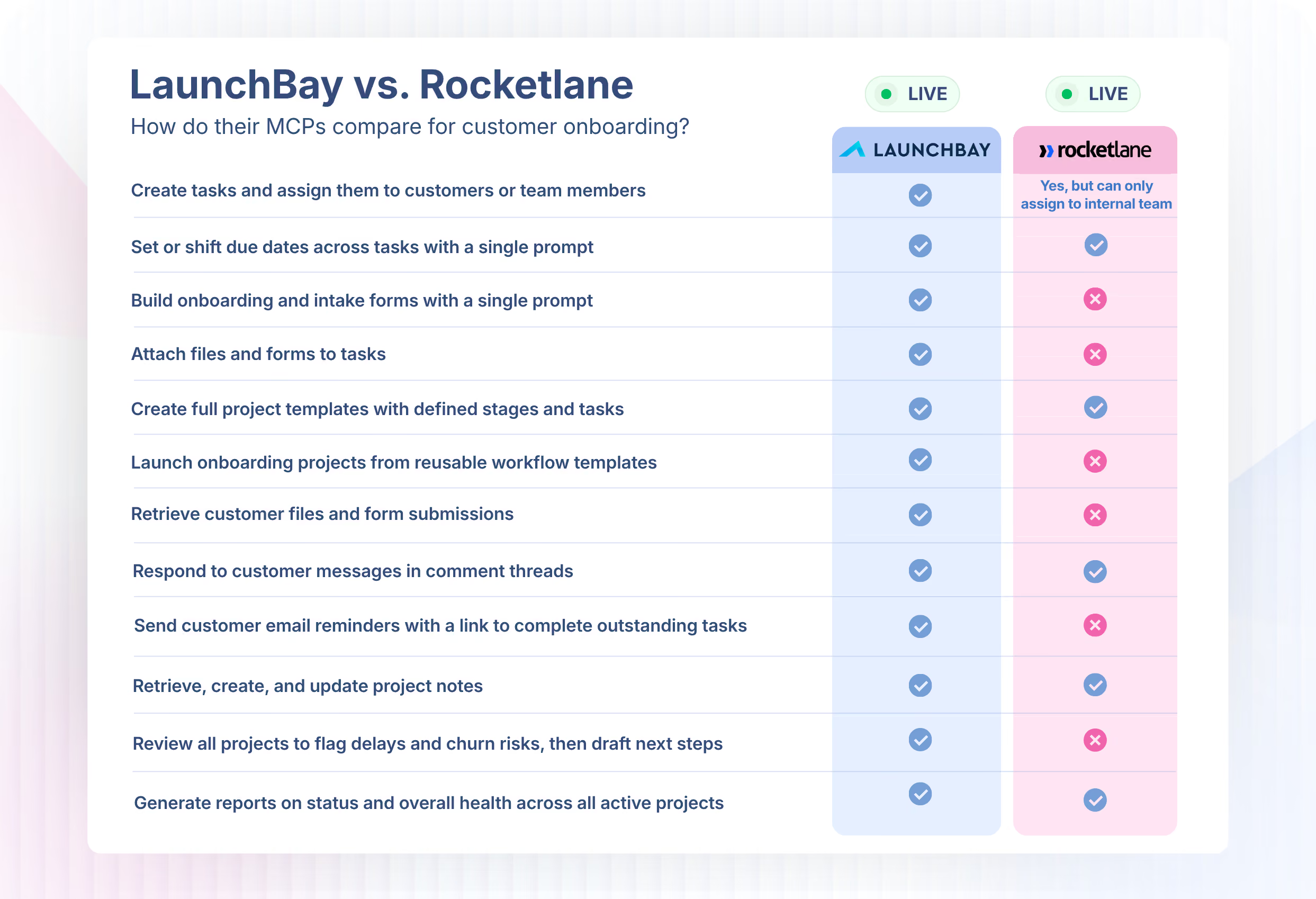
Full Feature Comparison
Beyond MCP, here's how LaunchBay and Rocketlane compare across every feature that matters for client onboarding.


Client Experience
Unlimited Client Portals
Yes
Yes
Loginless Client Portal Access
YES
Yes
White-labeling & Custom Domains
YeS
Yes
Project Progress Tracker for Clients
YES, BUT...
Client-facing trackers require heavy backend setup.
Yes
Every project includes an automatically updating project progress tracker
Custom App & Website Embeds
NO
Embedding requires dev-built custom apps—no simple “paste and embed.”
Yes
Embed forms, videos, calendars, apps, or sites via URL or iFrame.
Live Chat in Portals
NO
No real-time chat inside portals—only comment threads.
Yes
Clients can message, attach files, and collaborate through built-in live chat.
Admin & Back-office Tools
Digital Contract Signing
NO
No native e-signatures; requires a third-party tool.
Yes
Convert files into legally binding e-signature requests.
Client Directory (CRM)
Yes
Yes
Design Proofing
NO
No built-in tools for clients to review or approve designs.
Yes
Clients can review, comment on, and approve images, videos, and PDFs.
Client Service Requests
YES, BUT...
Requires complex setup and multiple views to manage requests.
Yes
Embed custom forms to collect and manage client requests.
Time Tracking
YES
Yes
Client Communication Inbox
No
No centralized inbox for client chats or messages.
Yes
Unified inbox for all client messages across projects.
Custom Fields
YES, BUT...
Must be configured at the account level, limiting flexibility.
YeS
Add custom fields per project or workflow with complete flexibility.
Workflow & Automation
Turnkey Automated Task Reminders
YES, BUT...
Reminders are account-level only; no per-task control.
Yes
Enable automated task reminders with a single click.
Workflow Automations
YES, BUT...
No automation logs and limited conditions; workflows can’t be project-specific.
Yes
Automations with clear logging for every run and can be customized per-project
Zapier Integration
YES
Yes
Recurring Tasks
NO
No native recurring tasks at the project or task level.
Yes
Create recurring client tasks for ongoing needs in seconds.
AI & Innovation
AI Project Builder
No
Onboarding templates must be created manually.
Yes
Auto-generates full project templates from a short prompt.
AI Form Builder
No
Forms must be created manually.
Yes
Describe a form in a few lines and LaunchBay builds it automatically.
AI Meeting Notes
NO
No automatic meeting summaries or task extraction.
Yes
AI converts your meetings into tasks, summaries, and next steps automatically.


Get back to the work you're best at.
LaunchBay's AI-powered client portal handles the collecting, reminding, and following up, so your team spends less time chasing clients and more time delivering.
Ready to stop chasing?
Discover how we stand out from the competition