.svg)
May 5, 2026
Slack Integration, Overhauled CRM, Smarter Reporting, and More!
By
Sam Chlebowski
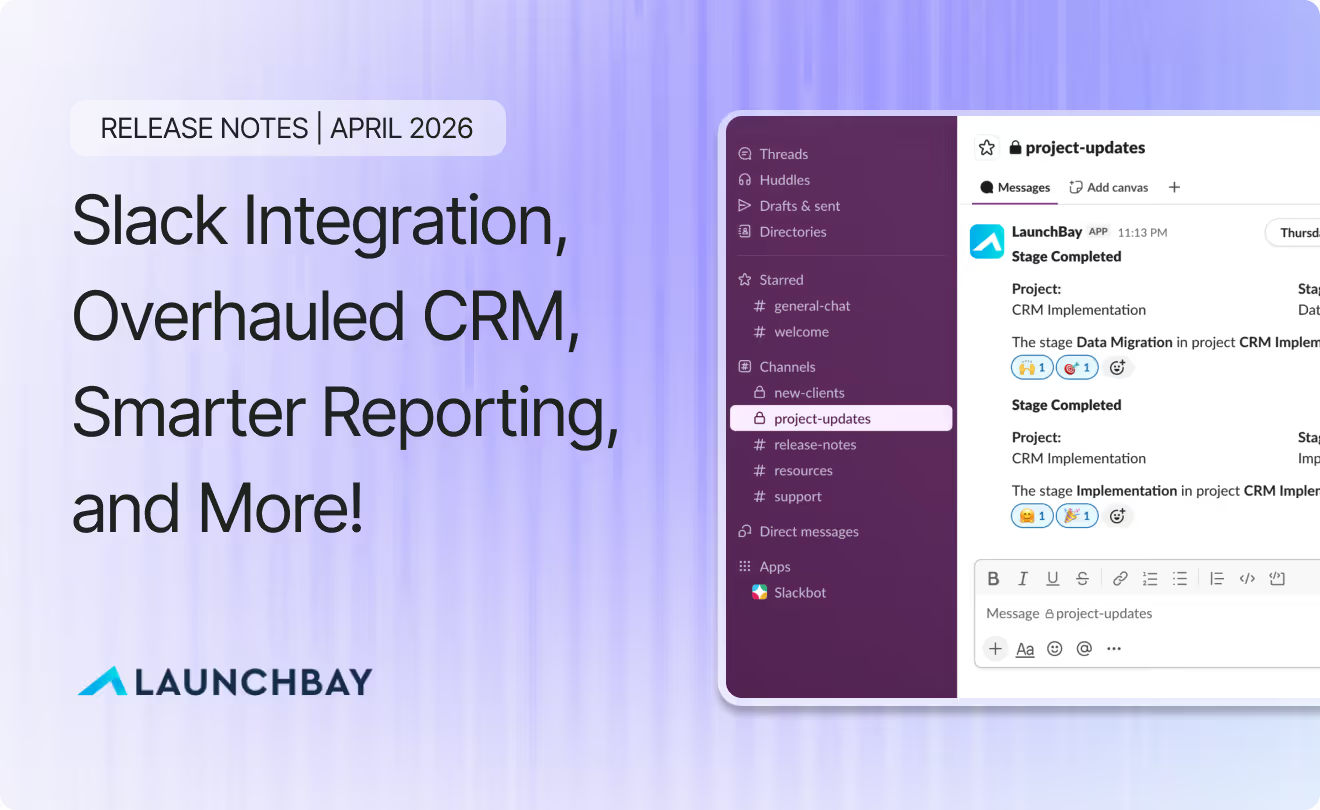
April was a big month. We shipped a native Slack integration, overhauled both the CRM and contract editor, made project reporting significantly more flexible, and added a suite of client portal improvements that give you more control over branding than ever before. Here's everything that's new.
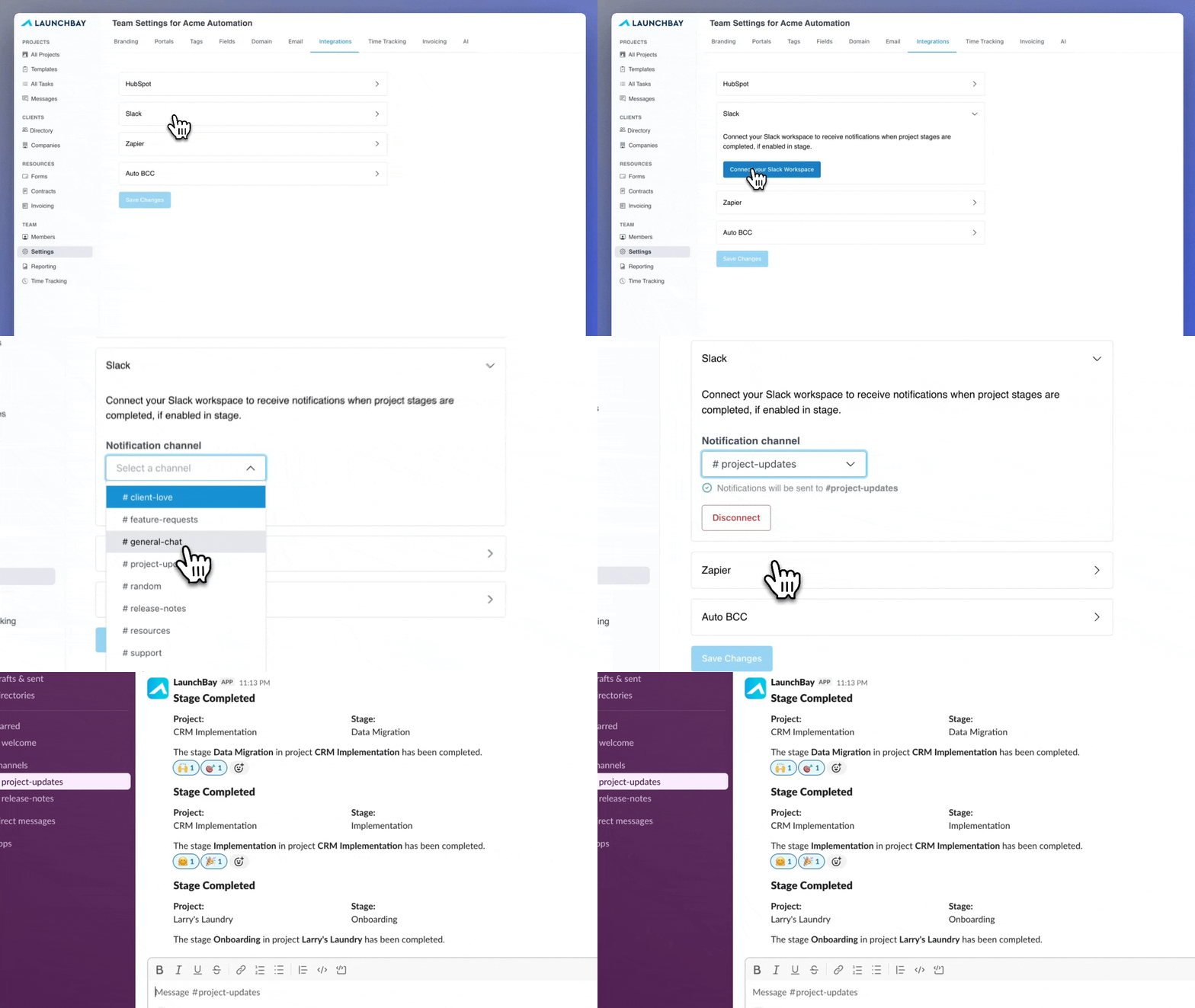
- Slack Integration: Connect your Slack workspace to receive real-time notifications when project stages are completed, delivered directly to a channel you specify.
- Project Reporting Enhancements: Toggle between task-level and stage-level views, filter by project owner, export to CSV, and stay oriented with a new sticky project name column.
- Overhauled CRM: A rebuilt Client Directory surfaces the right information for every record type, with new tabs for invoices, forms, and projects, plus bulk-add people to a new project directly from a company record.
- New & Improved Contract Editor: A redesigned editor makes setting up contracts faster, with a new sidebar for auto-populating custom fields from a dropdown and support for reusing the same custom field multiple times in a contract.
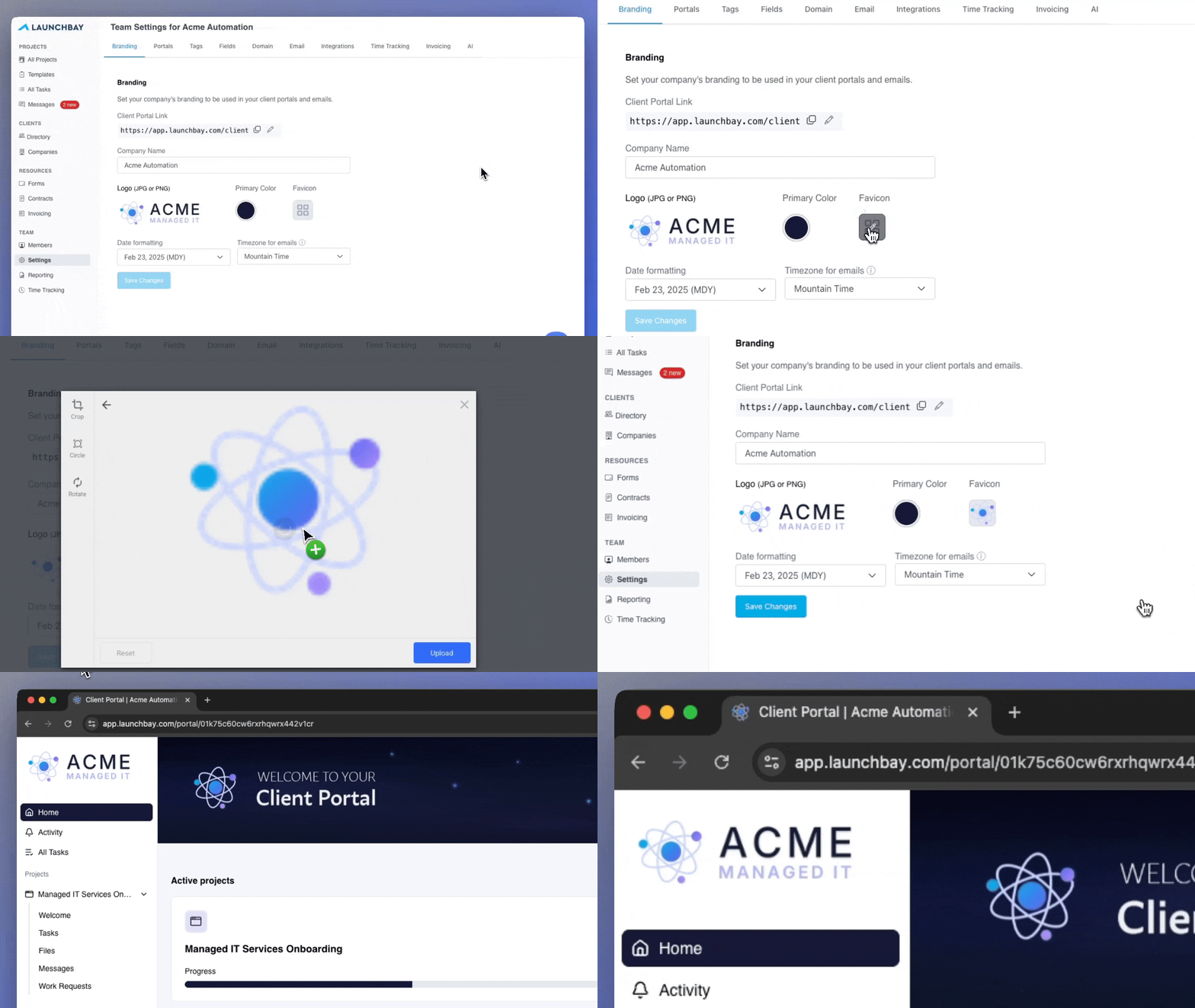
- Client Portal Enhancements: Custom portal banners are now fully mobile responsive, a library of ready-to-use banner templates is now available, and white-label plan users can now set a custom favicon via the Branding Tab in account settings.
- Additional Improvements & Quality-of-Life Updates: View proof approval status directly in the task builder, manage portal page visibility at the project level, add existing project files directly to tasks without reuploading, and more.
🔗 Slack Integration: Real-Time Stage Notifications in Slack
You can now integrate LaunchBay directly with Slack. Connect your Slack workspace to receive notifications when project stages are completed, delivered to a channel you specify. It's the fastest way to keep everyone (your team and your clients) in the loop without anyone having to check in manually. Click here for the full setup guide.
📊 Project Reporting Enhancements: More Flexible, More Visible Tracking
The project reporting interface has been overhauled to give you a clearer view of where every project stands. Whether you're doing a quick check-in or preparing a detailed status update, the new reporting view gives you exactly what you need to spot problems early and keep work moving.

Task-Level and Stage-Level Views
Toggle between a granular task-level view and a higher-level stages view to see exactly what's on track and what's falling behind.
Filter by Project Owner
Zero in on work being led by specific team members to quickly see how individual projects and workloads are progressing.
Export to CSV
Export your project reporting data to CSV for sharing with stakeholders or running deeper analysis outside of LaunchBay.
Sticky Project Name Column
Scroll across wide reporting views without losing track of which project you're looking at. The project name column now stays fixed as you move horizontally.
👥 Overhauled CRM: Every Client Detail in One Place
We rebuilt the Client Directory (CRM) from the ground up to make sure the right information is always within reach. Whether you're handing off a new project or reviewing a client relationship, the overhauled CRM gives your team a complete picture without having to dig.

Smarter Record Views
See the right information for each record type at a glance. Individual contact records surface last portal login and recent activity. Company records now show total revenue generated.
Rich Text Description on Company Records
Add sales notes, delivery context, or anything else your team needs for a smooth handoff in a dedicated rich text description area on every company record.
New Tabs for Invoices, Forms, and Projects
New overview, invoices, forms, and projects tabs give you a complete picture of all work associated with any person or company across every project, without switching between views.
Bulk-Add People to New Projects
Add all people associated with a company to a new project directly from the company record. No one-by-one assignments needed.
📝 New & Improved Contract Editor: Set Up Contracts Faster
Setting up contracts just got a whole lot faster. We redesigned the contract template editor from the ground up to cut down the friction of getting contracts out the door. Less manual work, more flexibility, and a new sidebar that handles the repetitive parts for you.
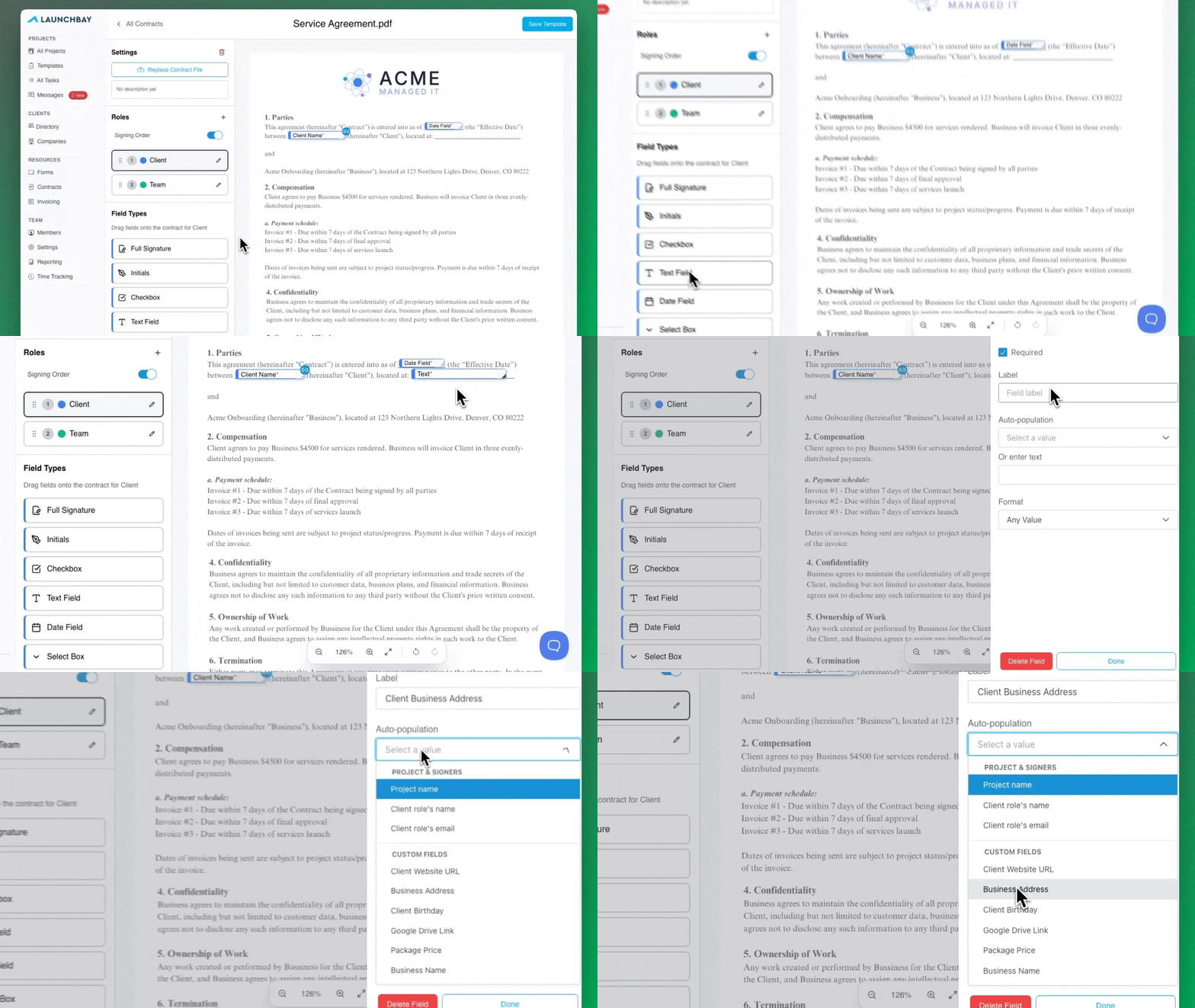
Auto-Populate Custom Fields from a Sidebar
Map contract fields to auto-populate any custom field by selecting it from a dropdown in the new sidebar. No more copy-pasting field IDs.
Reuse the Same Custom Field Multiple Times
Use the same custom field as many times as you need in a single contract without customizing a unique ID for each instance.
🎨 Client Portal Enhancements: Take Your Branding Even Further
Your client portals are often the first thing clients see when they log in to work with you. This release gives you more control over how those portals look and feel across every device and touchpoint.
Portal Banner Improvements
Custom portal banners are now fully mobile responsive, so your portals look sharp on every device your clients use. We've also added a library of ready-to-use banner templates to help you set up branded, customized portals faster, without starting from scratch.

Custom Favicons
If you're on a white-label plan, you can now set a custom favicon for your client portals via the Branding Tab in account settings. One more detail that makes the experience feel fully yours.
Additional Improvements and Quality-of-Life Updates
- Proof Approval Status in Task Builder: After sending tasks with proofs attached, you can now view the approval status of those proofs directly in the task builder, whether they're awaiting client review, have change requests, or have been approved.
- Redesigned Task Filters: The filters on both the All Tasks page and the Tasks page within individual projects have been redesigned to match the updated filter sidebar on the Projects Dashboard.
- Add Project Files Directly to Tasks: When attaching a file or proof to a task, you can now import a file that's already been uploaded to your project, eliminating the need to reupload. Especially useful when a team member uploads a deliverable in a private task and you want to attach it to a public task for client review.
- Target Completion Dates for Stages: Set a target completion date on any stage to give clients and team members more visibility into when key milestones will be delivered. Dates are visible in the client portal and included in stage notification emails.
- Hide Project Stages: Hide any stage from the client portal by clicking the "More" dropdown on a stage and selecting "Make Private," giving you more control over what clients see and more flexibility for internal collaboration.
- Time Tracking Stopwatch: Click into any task and select "Start Stopwatch" to track time as you work, without having to log it manually after the fact. Stay focused and stay accurate.
- Task Links in Email Notifications: Notification emails that reference multiple tasks now include direct links to each individual task, so clients can click straight into the specific task they need without hunting for it.
- Portal Page Management: Management of global portal pages (Files, Messages, Tasks) has moved out of account-wide settings. You can now configure each page as viewable or hidden within individual projects and templates from the Portal page, giving you more granular control over what clients can access.
Looking Ahead
May is shaping up to be another big month. In addition to dozens of improvements across the platform, we're also putting the finishing touches on one of our most requested features: a native MCP Server that will let you connect your favorite AI tools like Claude and ChatGPT to execute actions, pull reports, and more directly from LaunchBay.
For a full record of everything we've shipped so far, visit our changelog.


Take command of every customer onboarding.
One platform to run, monitor, and manage every customer onboarding, with full visibility into every account.
Ready to stop wondering where things stand?