
Customer onboarding software built for B2B SaaS teams
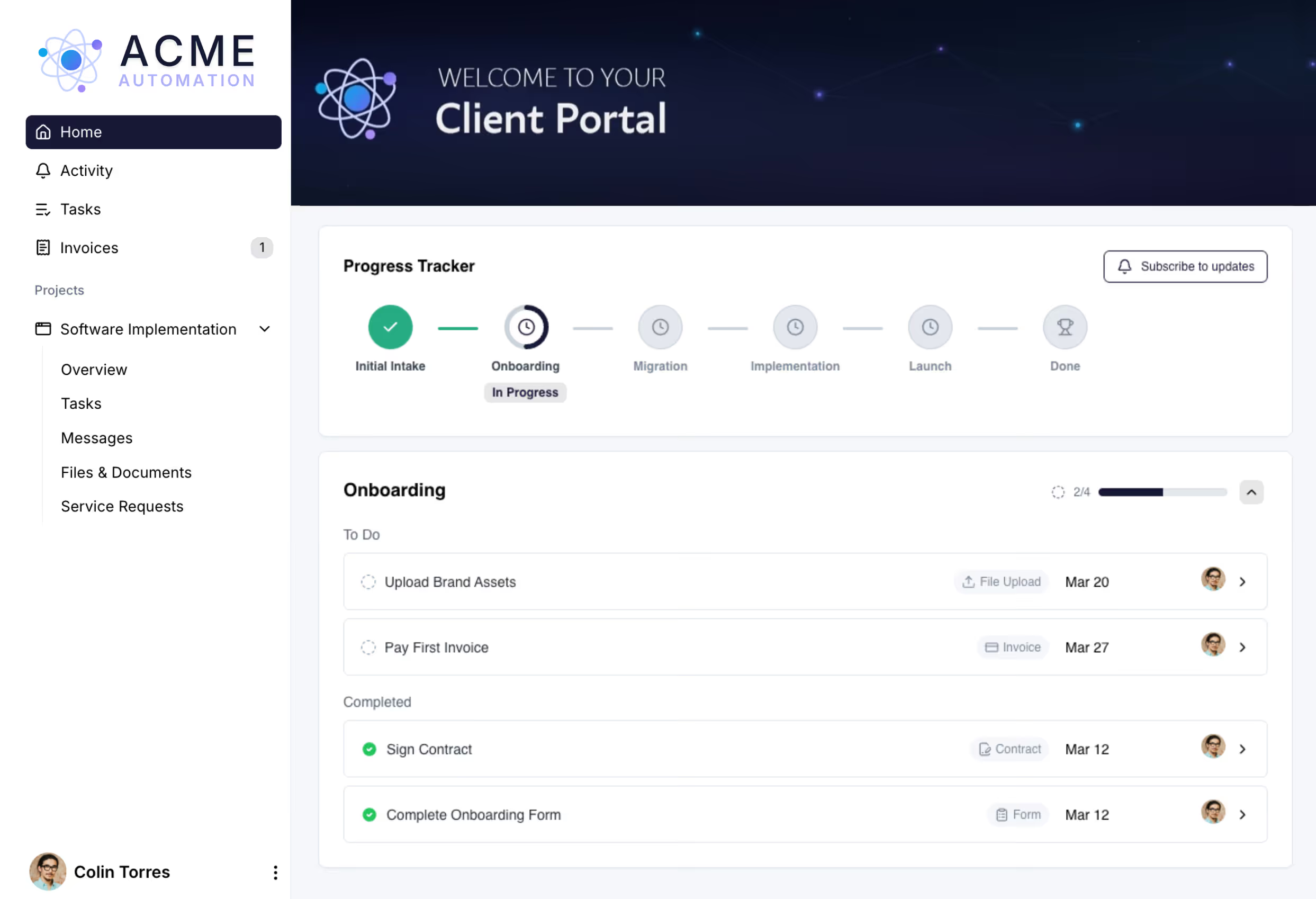
When customers buy software, they expect to see value fast. When you run onboarding from spreadsheets and emails, it slows that value down. LaunchBay automates onboarding and gives your customers a single portal where your team can implement on a predictable, repeatable timeline.
Powering 20,000+ customer onboardings every single month
LaunchBayClient Portal Software for B2B Teams

Everything B2B SaaS teams need to run customer onboarding without the chaos.

Branded Client Portals

LaunchBay centralizes every onboarding requirement in one portal. Customers always know where to go. Your team always knows what is done, what is missing, and what is blocking go-live.

Loginless Client Access

By removing the friction of creating an account or logging in each time, LaunchBay increases task completion rates, keeps onboarding moving, and helps software teams deliver first value faster.

Embedded eSignatures

Customers review and sign without leaving the portal so signatures are never a blocker. Send contracts, agreements, and more directly to your clients without needing a separate tool like DocuSign.

Seamless Integrations

Connect LaunchBay to HubSpot, Salesforce, Zapier, Stripe, and more. When a new client signs on, onboarding kicks off automatically and they get instant portal access to start uploading the information your team needs. No manual setup required.

Project Progress Tracker

Give customers a real-time view of where their onboarding stands. They see what's done, what's next, and where things are blocked. Your team sees the same view across every active onboarding, so you can step in before implementation projects stall.

Single, Centralized Inbox

Every portal has a single, centralized inbox, so implementation conversations, file attachments, and status updates stay organized by customer (not buried across 14 different email threads, three Slack channels, and a Notion doc).

Onboard customers faster. Stop churn before it starts.

Deliver a first impression that prevents dropoff

First impressions land in seconds. The moment a new customer signs on, their branded, loginless portal is ready, with onboarding tasks, kickoff documents, and team contacts already in place. No setup delays, no welcome email with login instructions to wait on. Just a polished experience that signals your team is on top of it.

Try LaunchBay for Free

Build scalable, repeatable onboarding workflows

Automate your onboarding process and eliminate friction at every step. Invite clients into branded, loginless portals the moment they sign, so you can start collecting the contracts, forms, and files you need to implement quickly.

Try LaunchBay for Free

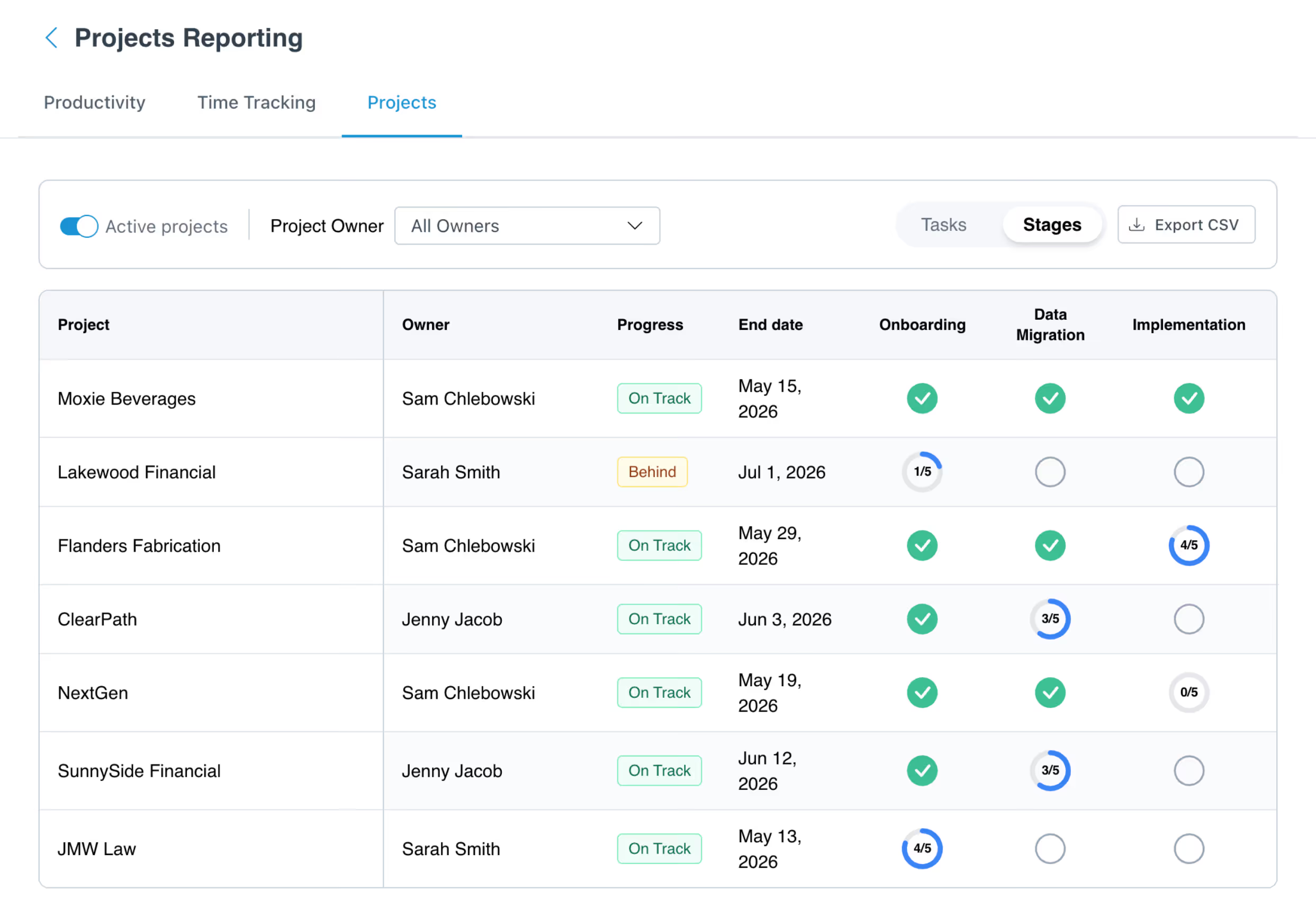
Actionable reporting to ensure smooth handoffs and eliminate dropped balls

Get real-time visibility across every onboarding and implementation project so you can surface blockers early, understand project health at scale, and act before delays turn into customer frustration or churn.
Try LaunchBay for Free

Built for teams where onboarding blocks growth

Ditch the spreadsheets and follow-up emails. LaunchBay centralizes every task, file, and approval, so onboarding and implementations move faster with fewer bottlenecks.

Run structured customer onboarding and implementations with clear ownership and visibility

"LaunchBay does everything we've dreamed of and more when it comes to onboarding software customers."

Clients access portals with a single, secure link
Automated follow-ups for client tasks
Built-in chat centralizes client communication
Learn More →
Standardize client onboarding across every managed service

"Our biggest clients have started referring even bigger clients, and it's a direct result of our client portal experience."

Clients access portals with a single, secure link
Automated follow-ups to collect client information, documentation, and work requests
Unified inbox for ongoing client communication and work requests
Learn More →
Keep complex CRM setups on track while collecting client data, access, and approvals

"Before LaunchBay, we would spend over four hours per client tracking down onboarding information. Now, that entire process takes just 15 minutes."


File annotations and approvals
Collect files, forms, and signatures
Automated task reminders
Learn More →
Manage document-heavy, approval-driven onboarding with clarity and control

"Since implementing LaunchBay, a single team member can do the same work that once required four people."

Automate client onboarding in white-label portals
Collect forms, files, signatures, and more
Track project progress and eliminate roadblocks
Learn More →

Frequently Asked Questions (FAQs)

What is the B2B SaaS customer onboarding process and how does LaunchBay support it?
The B2B SaaS customer onboarding process typically covers everything from contract close to fully activated customer: kickoff and handoff from sales, account configuration, integration setup, user training, go-live, and the first few weeks of post-launch support. LaunchBay supports the entire process inside one branded, loginless portal. New customers click a magic link the moment a deal closes and land in a workspace with their onboarding tasks, configuration docs, training materials, and your team's contact info already in place. Your team tracks progress across every active onboarding from a single dashboard, automated reminders chase outstanding inputs, and every milestone is timestamped, so you have a clear record of what was completed and when.
How does LaunchBay help B2B SaaS teams reduce time-to-value?
Time-to-value usually slips for two reasons: kickoff delays and customer-side bottlenecks. LaunchBay attacks both. New customer portals are auto-created the moment a deal closes, so kickoff isn't waiting on internal handoffs. Inside the portal, customers complete tasks loginlessly, automated reminders chase outstanding items, and your team gets real-time visibility into what's blocked. SaaS teams using LaunchBay typically cut implementation time noticeably and free up their CS team to focus on adoption instead of admin.
Can LaunchBay replace our current customer onboarding tools and spreadsheets?
For SaaS teams currently running customer onboarding across spreadsheets, project management tools, contract software, and shared inboxes, LaunchBay consolidates most of that into one customer-facing platform. You get task management, embedded eSignatures, file sharing, approvals, and customer messaging inside branded portals. Teams typically use LaunchBay alongside their CRM (HubSpot or Salesforce) for deal data and connect it to the rest of their stack through native integrations and Zapier.
Can we white-label the customer portal to match our product brand?
Yes. All LaunchBay plans include branding customization: your logo, brand colors, and company name across portals and email notifications. On the Premium plan, you can set a custom portal domain (like onboarding.yourproduct.com), use a custom sending email address, upload a favicon and header image, and remove every trace of LaunchBay branding. Customers experience the entire onboarding journey as a natural extension of your product.
Does LaunchBay support different customer onboarding workflows by segment or product tier?
Yes. LaunchBay supports unlimited project templates, so you can build a distinct customer onboarding workflow for each segment, product tier, or use case. Self-serve customers get a lightweight onboarding portal. Mid-market customers see a structured plan with assigned milestones. Enterprise customers get a full project portal with dedicated pages for security review, technical configuration, and stakeholder approvals. Each template can include its own embedded tools, custom pages, and automation rules.
How does LaunchBay compare to other customer onboarding software for B2B SaaS?
Most customer onboarding tools are either checklist apps without a customer-facing surface, or generic project management tools your customers can't easily use. LaunchBay is a full customer collaboration platform: tasks, embedded eSignatures, approvals, communication, native integrations, and progress tracking, all in a branded portal your customer actually wants to log into. For SaaS teams running structured onboarding at scale, that translates to fewer tools, fewer follow-ups, and a customer experience that supports your activation and retention metrics.
Does LaunchBay support password-protected portals for security-sensitive customers?
Yes. LaunchBay uses loginless magic links by default for a frictionless customer experience, which is what most B2B SaaS implementations want. For enterprise customers or security-sensitive accounts, teams on the Premium plan can enable password-protected portals as a global account setting. When enabled, customers set a password for their account and log in with their credentials instead of clicking a magic link.
Does LaunchBay integrate with HubSpot, Salesforce, and the CRMs B2B SaaS teams use?
Yes. LaunchBay has a native HubSpot integration and a native Salesforce integration, plus Zapier for connecting to the rest of your stack. SaaS teams typically trigger customer portal creation directly from CRM deal-stage changes, so kickoff starts the moment a deal closes. Contact and account data sync into LaunchBay automatically, eliminating duplicate data entry and giving your CS team full context before they pick up the customer.

Run client work the smarter way

Replace scattered tools with one branded portal for onboarding clients, coordinating work, and delivering a better client experience.