Oct 9, 2026
Assembly Client Portal Review: We Had Claude Build a Real Agency Onboarding in It
By
Zack Garbow
We put Assembly through the same test as six other client portal tools: build a real 10-week website redesign onboarding for a dental practice client, using Claude on the tool's free plan. Assembly's contract builder and magic-link access are genuinely good. Its task system has no concept of a stage, which matters for a 10-week build with review cycles.
This review is part of our Best Client Portal Software series, where we had Claude (Opus 5.5) build the same agency onboarding project in seven tools and graded each one on the same nine categories. See the full roundup and scorecard there.
Assembly's Client Portal Scorecard
Assembly covered 4 of the 20 required capabilities natively, the lowest native count in the whole test. It landed a D+ overall: a clean, well-branded portal shell held back by a 5-app paywall cap and a task system with no concept of a project stage.
| Category | Grade | Why |
|---|---|---|
| Spec coverage | D | Only Tasks and Contracts were usable on the free plan. 4 of 20 capabilities native; most others are workarounds or paywalled. |
| Setup speed | C | Apps and the contract builder are fast, but tasks have to be entered upside down, templates are one per stage, and the Tasks app itself is slow to load. |
| Team workflow | D | Internal tasks inside a client stage are exposed to the client and assigned to them. No review gate or checklist block. |
| Payments & contracts | C | E-signature is solid, but there's no sequential signing order, the contract isn't linked to tasks, and payments are untested behind the paywall. |
| Review & approvals | D | Approval is just a Mark as Done button. Proofing is a paywalled, AI-generated template app, not a core feature. |
| Workflow functionality | D | No stages, sequencing, gating, or dependencies. Everything is visible to the client at once, in scrambled order. |
| Admin overhead | D | Reverse task entry, no manual reordering, and 9 templates applied by hand, about 7 clicks each. |
| Customization | C | Branding, a portal home page, and an AI app builder exist, but most of what you'd actually use sits behind the paywall. |
| Reusability | B- | Stage and contract templates are reusable, and the dynamic {{Current Month}} field makes monthly re-runs genuinely easy. No whole-project template. |
| Overall | D+ | A clean client portal shell with good e-sign and magic links, but not a staged onboarding workflow, and it exposes internal work to clients. |
What We Built, and What Assembly Got Right
On Assembly's free plan, only the Tasks and Contracts apps could actually be installed. Everything else the brief needed, forms, invoices, file collection, proofing, and embeds, sits behind a paid plan capped at 5 apps, short of the 7 to 9 this spec actually needs. We built what the free plan allowed and scored the rest from Assembly's own listings.

Three things stood out as genuinely good:
- Contract builder. Drag-and-drop signature and date fields, autofill variables, and reusable templates all worked well.
- Access and support. Passwordless magic links, plus a "Sign in as contact" view that shows exactly what Dana sees.
- Recurring work. A dynamic {{Current Month}} field fills in the month automatically, making the monthly care cycle genuinely easy to re-run.
Where Assembly Breaks Down
Assembly's Tasks app has no concept of a project or a stage. Each stage had to be built as a parent task template with its own tasks as subtasks, and template subtasks are inserted at the top with no way to reorder them, so we had to enter each stage's tasks bottom-up just to get them to display in the right order. Applying the template reverses them again.
The result: Dana's portal shows all 8 stages plus the monthly Website Care stage at once, in scrambled order, with subtasks reversed. Stage 1 lists "Pay Project Deposit ($6,000)" before "Sign Website Design Agreement."

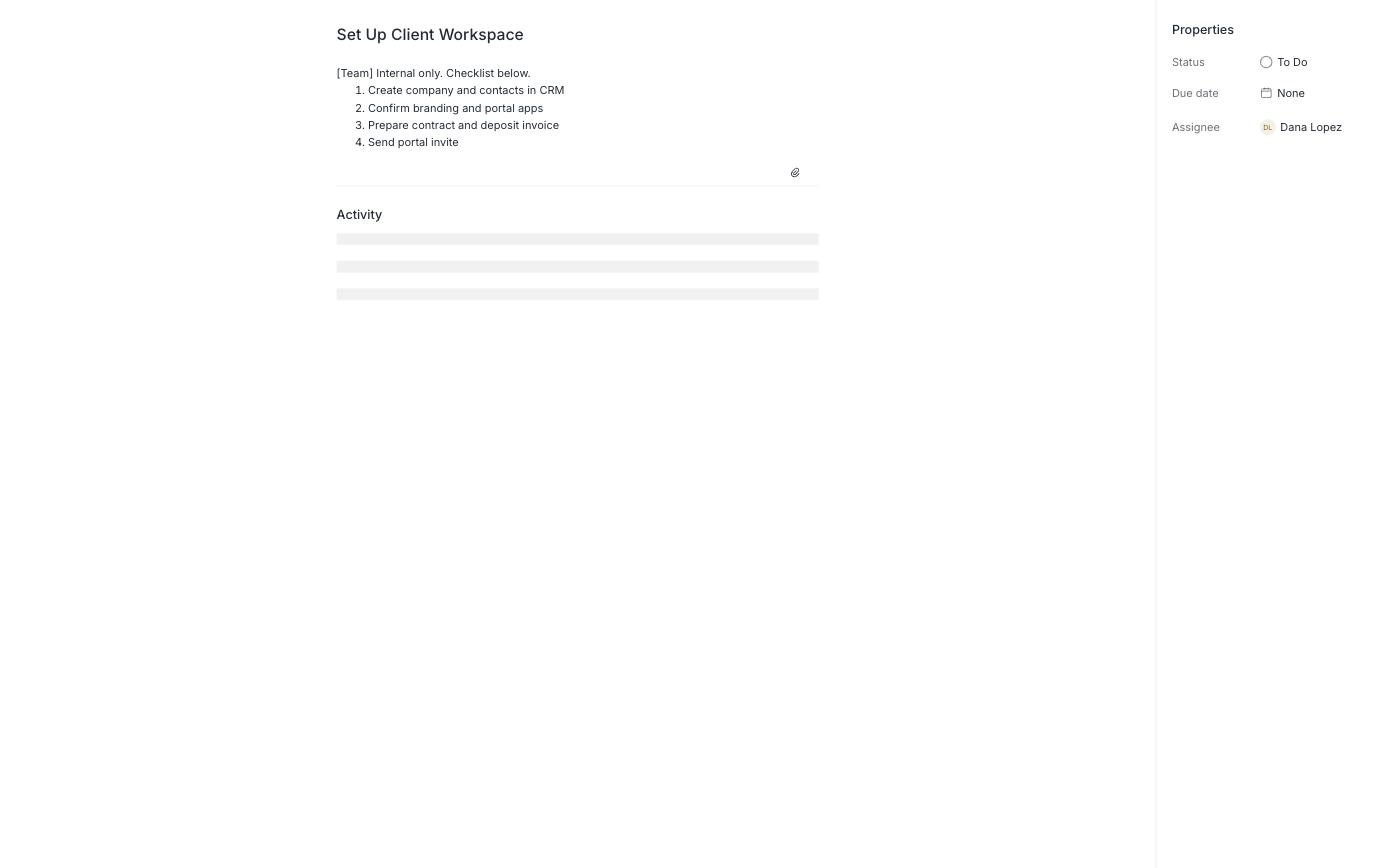
Internal work leaks straight through. A subtask always inherits its parent stage's client assignee, live tasks have no visibility setting, and the subtask assignee picker only offers the client. That means internal checklists like "Set Up Client Workspace" show up in Dana's portal labeled "[Team] Internal only," fully readable, with a Mark as Done button she can click herself.
Build time ran about 35 minutes exploring the product plus the CRM, contract, and Stage 1, then 3 to 4 minutes per stage template once the reverse-entry pattern was worked out, plus roughly a minute to apply each one. We estimate 60 to 75 minutes for someone building both templates in Tasks by hand, before even reaching the paywall for forms and invoices.
A Few Stranger Findings
A handful of details that didn't affect the grade but are worth knowing before you build in Assembly:
- The portal home promises that anything needing Dana’s attention appears at the top. What’s at the top is a canyon.
- Stage 1 tells Dana to sign in the Contracts tab, which says “No contracts have been shared yet.”
- The app catalog opens with an AI greeting, “Priya, what app will you add?”, then paywalls the second app you try to add.
- The “I agree to be legally bound” box on the contract comes pre-checked.
Our Verdict on Assembly
Assembly is a clean, well-branded client portal with strong basics: e-signature contracts, magic-link access, a Sign in as contact preview, and messaging. It isn't a workflow tool for a multi-stage agency onboarding. Its Tasks app has no concept of a project or a stage, so applying stage templates shows the client every stage at once, out of order, and assigns the agency's own internal checklists to the client with a Mark as Done button. The fixes, conditional forms, proofing, a project tracker, document collection, all sit behind a paid plan capped at 5 apps. The one real bright spot is recurring work: the monthly Website Care template re-runs cleanly with the month filled in automatically. Assembly fits simple sign, pay, chat clients. It's a poor fit for a 10-week build with review cycles.
.svg)

Assembly's backend tools work, but the client-facing side wasn't checked before this build shipped: scrambled stages, a mismatched banner, and internal tasks a client shouldn't have seen.
Head-to-head: LaunchBay vs. Assembly →How Assembly Compares
Assembly finished 6th of 7 in our full roundup. Here's how it stacks up against the tool that finished 1st.
| Assembly | LaunchBay | |
|---|---|---|
| Overall grade | D+ | B |
| Native capabilities (of 20) | 4 | 16 |
| Team workflow | D | A- |
| Workflow functionality | D | B- |
| Internal tasks hidden from client | Not supported | Built in |
See the full 7-tool scorecard for how every tool compares, or the LaunchBay vs. Assembly page for a deeper head-to-head.
Frequently Asked Questions
Everything you need to know about Assembly as a client portal.


Get back to the work you're best at.
LaunchBay's AI-powered client portal handles the collecting, reminding, and following up, so your team spends less time chasing clients and more time delivering.
Ready to stop chasing?