.svg)


Looking for the best
GUIDEcx alternative?
GUIDEcx handles onboarding basics well, but its strict templates, lack of built-in proofing, and limited flexibility hold growing teams back.
Why do users prefer LaunchBay?
40+
hours saved
per week with reusable workflows and templates.
83%
faster onboarding
with automated contract, forms, and file collection.
2x
new client capacity
by streamlining onboarding, updates, and communication.
72%
fewer follow-ups
with automated client reminders and real-time project tracking.
TRUSTED BY 1000+ CUSTOMER ONBOARDING & OPERATIONS LEADERS AT TOP B2B COMPANIES
.avif)


.avif)

.avif)

.svg)






“Before LaunchBay, we would spend over four hours per client tracking down onboarding information. Now, that entire process takes just 15 minutes—freeing up our team to focus on delivering value instead of chasing clients.”
GUIDEcx customers are switching to LaunchBay — here’s why
No native file proofing
GUIDEcx lets clients upload files, but there’s no built-in way to review them. Clients can’t leave inline comments, mark up images or PDFs, or approve deliverables inside the portal, so teams still rely on external tools and email chains.
No native digital signatures
GUIDEcx offers task sign-offs and attachments, but it doesn’t include a real e-signature system. You can’t add signature fields to contracts, collect legally binding signatures, or track who signed what. Teams must rely on external e-signature tools.
Limited custom fields for client-facing work
GUIDEcx supports custom fields, but they’re geared mostly toward internal data and reporting. They can’t personalize the client portal, fill forms or contracts, or power dynamic client experiences.
Not ideal for creative or deliverable-heavy projects
GUIDEcx is designed for step-by-step onboarding workflows. But if your projects involve creative deliverables, frequent revisions, or changing priorities, its rigid structure can make it harder to adapt as you go.

Sourced from verified G2 & Capterra reviews
Onboard smarter and scale faster with LaunchBay
Built-in file proofing your clients actually use
Upload images, PDFs, or videos and let clients leave inline comments, request changes, and approve deliverables—all inside the portal. No extra apps or messy email threads. Everything stays in one clear, organized place.
Integrated e-signatures for contracts and approvals
Send contracts, collect legally binding signatures, and automatically trigger next steps the moment a client signs. LaunchBay replaces external signature tools, making contract workflows smoother and reducing onboarding delays.
Dynamic, client-facing customization
Use custom fields to autofill documents, personalize tasks, embed dashboards, or pull client-specific data into the portal. Your clients get a tailored experience, and your team gets workflows that scale effortlessly.
Fast, flexible workflows for any type of project
LaunchBay isn’t limited to step-by-step onboarding flows. You can manage creative work, ongoing retainers, complex deliverables, and projects that change as they go. Build workflows that fit your process, not the other way around.
4 areas where LaunchBay dominates GUIDEcx
Manage creative and evolving workflows without the limitations

Handle creative work, ongoing retainers, and projects that evolve over time without bending your process to fit the tool. LaunchBay supports flexible task flows, dynamic stages, multiple revisions, and creative deliverable cycles—making it ideal for fast-moving client work.

Built for structured onboarding, GUIDEcx follows more linear, step-by-step workflows. Creative deliverables, multiple revision rounds, or changing project requirements can feel restrictive, making it harder to adapt as projects evolve.
Collect deliverable feedback and approvals in one place

LaunchBay streamlines deliverable reviews by letting clients comment, request changes, and sign off on assets directly in the portal. Everything lives in one place, making revisions faster and easier for your team.
Clients can upload files, but there’s no native proofing or inline feedback. Teams must rely on outside tools for markup and approvals, which leads to scattered context and extra steps for both sides.
Send and automate contract signing without extra tools
LaunchBay includes integrated e-signatures. Add signature fields, send contracts, collect legally binding signatures, and trigger automations the moment a document is signed—keeping everything inside one smooth workflow.
GUIDEcx supports basic task sign-offs but not true digital contract signing. There’s no way to add signature fields or automate next steps, so teams must use third-party e-signature tools.
Personalize every client experience with dynamic custom fields
LaunchBay uses custom fields to tailor each client’s portal and keep projects feeling personalized without extra setup or duplicate work.
Custom fields exist but are mostly internal. They’re not built to personalize client-facing content or drive dynamic portal experiences, limiting flexibility and consistency across projects.
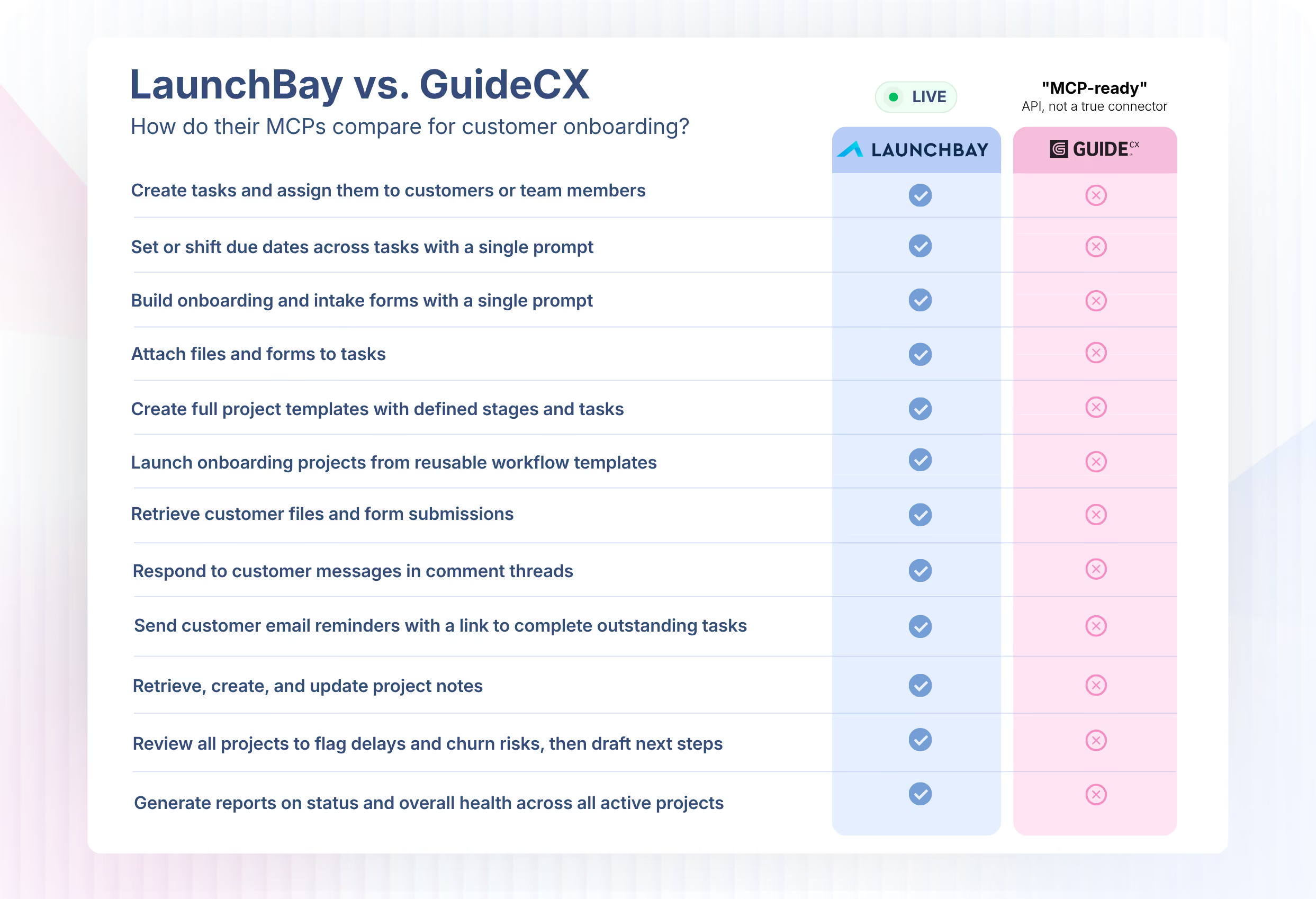
GuideCX vs. LaunchBay: only one has a working MCP
GuideCX describes itself as "MCP-ready," but there's no published connector to actually use. LaunchBay's MCP is live today, with tools built specifically for customer onboarding.
Full feature comparison
GuideCX slows teams down with heavy setup. LaunchBay delivers an all-in-one onboarding platform that works with any tool, launches fast, and scales effortlessly.


Client Experience
Unlimited Client Portals
Yes
Yes
Loginless Client Portal Access
yes
Yes
White-labeling & Custom Domains
YeS
Yes
Project Progress Tracker for Clients
yes
Yes
Custom App & Website Embeds
no
Yes
Live Chat in Portals
NO
No native live chat inside portals.
Yes
Clients can message, attach files, and collaborate through built-in live chat.
Admin & Back-office Tools
Digital Contract Signing
NO
No native e-signatures; requires a third-party tool.
Yes
Convert files into legally binding e-signature requests.
Client Directory (CRM)
no
Yes
Design Proofing
NO
No native tools for clients to review or approve designs.
Yes
Clients review, comment on, and approve images, videos, and PDFs.
Client Service Requests
No
Only basic request collection; no structured intake forms.
Yes
Embed custom forms to collect and manage client requests.
Time Tracking
yes
Yes
Client Communication Inbox
yes
Yes
Custom Fields
YES
YeS
Workflow & Automation
Turnkey Automated Task Reminders
yes
Yes
Workflow Automations
yes
Yes
Zapier Integration
YES
Yes
Recurring Tasks
no
Yes
AI & Innovation
AI Clients
No
No simulated clients for workflow testing or prototyping.
Yes
Simulated AI clients for testing onboarding workflows.
AI Project Builder
No
Onboarding templates must be created manually.
Yes
Auto-generates full project templates from a short prompt.
AI Form Builder
No
Forms must be created manually.
Yes
Describe a form in a few lines and LaunchBay builds it automatically.
AI Meeting Notes
NO
Not supported.
Yes
Automatically turns transcripts into tasks and follow-ups.


Get back to the work you're best at.
LaunchBay's AI-powered client portal handles the collecting, reminding, and following up, so your team spends less time chasing clients and more time delivering.
Ready to stop chasing?
Discover how we stand out from the competition