Oct 7, 2026
Best Client Portal Software in 2026: We Had Claude Test 7 Tools
By
Zack Garbow
We gave an AI the same agency onboarding brief and had it build a real project in seven client portal tools. Six of the seven scored C+ or lower. Even the winner lost points in four categories.
Most "best client portal software" lists are feature grids copied from vendor pricing pages. We wanted to know what actually happens when you sit down and build something. So we handed Claude (Opus 5.5, High effort) one realistic brief and had it set up the same 10-week website redesign onboarding in every tool, logging every click, workaround, and bug along the way.
Disclosure: LaunchBay makes one of the tools tested. For fairness, every grade below traces back to a build log, and it's why our own weak spots are highlighted like everyone else's.
The short version:
- Tools tested: Rocketlane, Dock, Content Snare, Assembly, SuiteDash, Sydnee, and LaunchBay.
- Grades: LaunchBay earned the only B. Content Snare got a C+; Sydnee, SuiteDash, and Rocketlane got C's; Assembly got a D+; Dock got a D.
- The common failure: money and sign-offs. Four of seven tools had no native way to collect an online payment inside the portal.
How We Tested 7 Client Portal Tools
Every tool got the same brief, the same AI tester, and the same checklist of 20 required capabilities. Claude built each project in a browser on the tool's free trial or free plan.
The brief: a fictional web agency onboarding Dana, the office manager at a dental practice, onto a 10-week website redesign. A tool had to handle:
- 8 stages and 30+ tasks, from kickoff through launch, with due dates and owners.
- Four intake forms with conditional logic, so Dana only sees the questions that apply to her.
- A signed contract with a signing order, where the agency signs first and the client second.
- A $6,000 deposit collected inside the portal.
- Design review, where the client approves or marks up design files.
- Internal-only tasks the client never sees.
- A reusable monthly care plan that re-runs inside the same portal after launch.
After each build, Claude logged in as Dana on desktop and mobile to see what the client actually experiences. Each tool was then graded on nine categories: spec coverage, setup speed, team workflow, payments and contracts, review and approvals, workflow functionality, admin overhead, customization, and reusability.
The Client Portal Scorecard
LaunchBay finished first by nearly a full grade point; the middle of the pack is close enough that small changes in weighting could reshuffle it.
| Rank | Tool | Overall Grade | Native Capabilities (of 20) | Weighted Score (of 4.0) |
|---|---|---|---|---|
| 1 | LaunchBay | B | 16 | 3.00 |
| 2 | Content Snare | C+ | 10 | 2.05 |
| 3 | SuiteDash | C | 9 | 1.90 |
| 4 | Sydnee | C | 8 | 1.75 |
| 5 | Rocketlane | C | 11 | 1.67 |
| 6 | Assembly | D+ | 4 | 1.51 |
| 7 | Dock* | D | 6 | 0.80 |
* Partial build: Dock's account verification was never granted, so its client walkthrough was not completed.
The weighted score counts client experience at 40% (payments, contracts, and approvals), admin effort at 30% (setup speed and overhead), and functionality depth at 30% (the other five categories).
Here's every grade, category by category, sorted by overall grade.
← Scroll to see all 9 categories →
| Tool | Spec Coverage | Setup Speed | Team Workflow | Payments & Contracts | Review & Approvals | Workflow Functionality | Admin Overhead | Customization | Reusability | Overall |
|---|---|---|---|---|---|---|---|---|---|---|
| LaunchBay | B | B | A− | B | B+ | B− | C+ | B+ | B | B |
| Content Snare | C+ | B | C− | D | C | B− | C− | B | B− | C+ |
| Sydnee | C | B | B | F | D | C | C | B | B+ | C |
| SuiteDash | C+ | D | B | C− | C | B− | D | B | B+ | C |
| Rocketlane | C | C | B | F | C | B− | D | B− | B+ | C |
| Assembly | D | C | D | C | D | D | D | C | B− | D+ |
| Dock* | D | D | C | F | F | D | D | C+ | C | D |
* Partial build: Dock never approved the trial account for client sharing, so its client walkthrough couldn't be tested.
Results: Every Client Portal, Worst to Best
Dock
D
The AI said it built 7 stages. It built one.
Dock has a nice internal-task toggle with an instant client preview, and its relative due dates calculated correctly. But it has no invoicing, no client approval step, and no proofing. The trial account couldn't share anything with a client until Dock manually verified it, which never happened. Dock AI also announced it had added Stages 2 through 8, then built a single stage, out of order, in the wrong kind of block.
.svg)

<TL;DR>
Dock's deal-room-first design shows: no native payments, no approvals, and its AI overstated what it actually built. The trial never reached a real client view.
Read the full Dock review →Assembly
D+
A dental portal decorated with a canyon.
Assembly's contract builder worked on the first try, with client details filled in automatically, and its "Sign in as contact" preview showed exactly what Dana would see. What Dana saw was rough. Every stage appeared at once in scrambled order (Stage 1, Website Care, 8, 7, 6…), subtasks ran in reverse, and the portal banner was a desert canyon. Tasks labeled "[Team] Internal only" were assigned to Dana with a Mark as Done button. Forms, file collection, and payments sit behind a paywall that caps paid plans at 5 apps, fewer than the 7 to 9 this brief needed.
<TL;DR>
Assembly's backend tools work, but the client-facing side wasn't checked before this build shipped: scrambled stages, a mismatched banner, and internal tasks a client shouldn't have seen.
Read the full Assembly review →Rocketlane
C
"Congratulations on choosing !"
Rocketlane was fast to build in, with keyboard-driven planning, templates that imported into a live project, and per-stage progress bars for the client. But contracts, payments, and proofing all require outside tools, such as DocuSign connected through Zapier. The default client portal greeted Dana with "Congratulations on choosing !", a "© 2025 Acme" footer, and a logo that appeared to belong to a different dental practice. Saving one form failed with an error six times in a row.
<TL;DR>
Rocketlane's planning tools are genuinely fast to build in, but it leans on outside tools for contracts and payments, and default placeholder content made it to the client's screen untouched.
Read the full Rocketlane review →Sydnee
C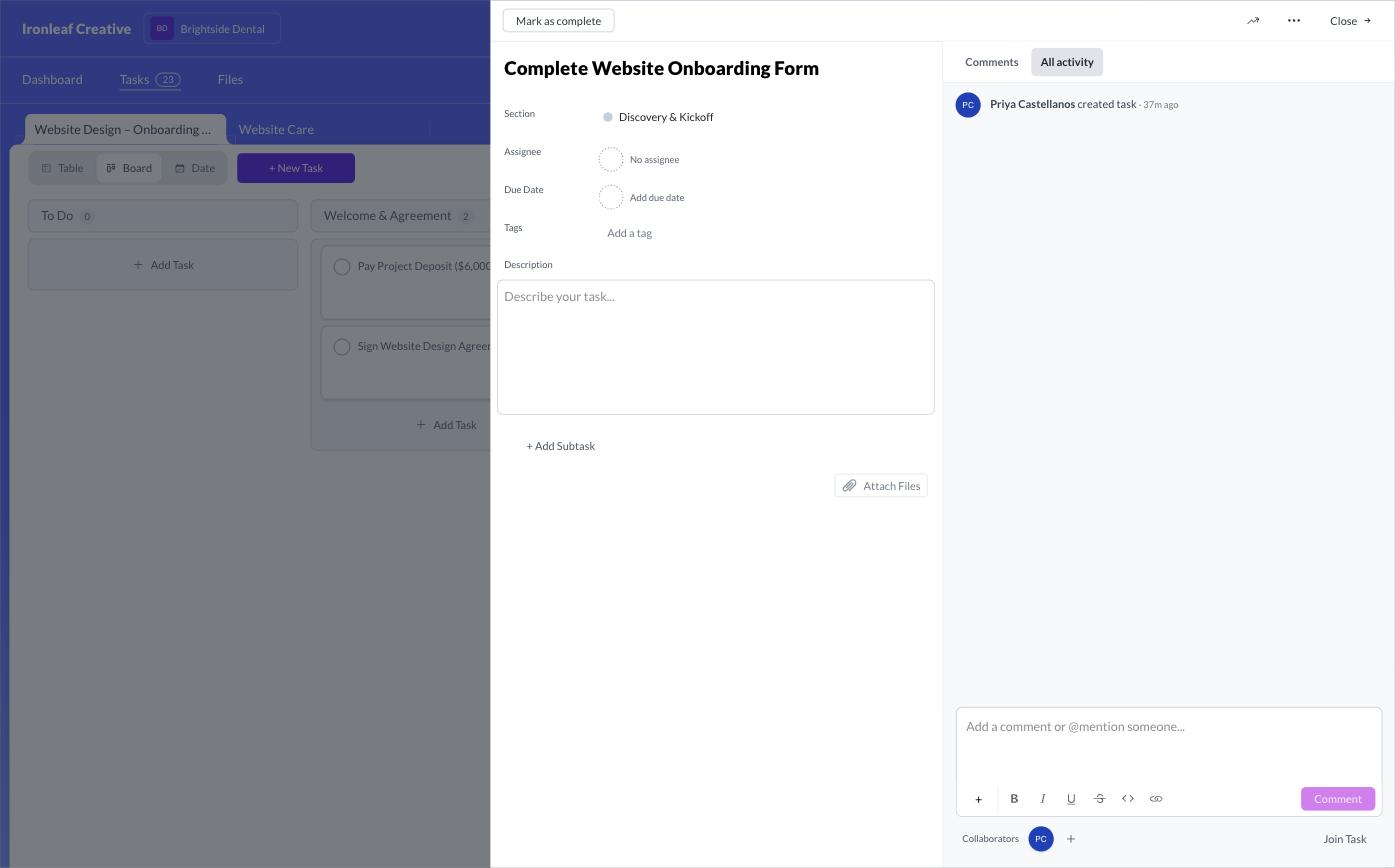
"All caught up!" with 23 tasks left.
Sydnee handled all six conditional form rules without friction, re-ran the monthly care template cleanly, and had the cleanest mobile layout we saw. The catch is that forms can't attach to tasks. Dana's "Complete Website Onboarding Form" task opened with no form in it, and her dashboard told her she was "All caught up!" while 23 tasks waited. There's also no native way to take a payment or collect an e-signed contract.
<TL;DR>
Sydnee has the cleanest mobile experience we tested, but forms and tasks live separately, so a client's dashboard can say "all caught up" while real work is still outstanding.
Read the full Sydnee review →SuiteDash
C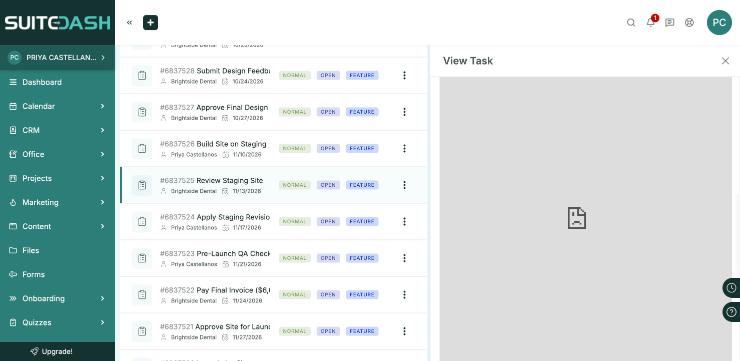
Everything included, 20 notifications on day one.
SuiteDash had the broadest built-in toolkit of the competitors: PDF e-signatures, invoicing, client approvals, and templates that re-applied to a live project. The client side undid a lot of that. Dana saw a flat task list with no stage names, monthly care tasks from January 2027 at the top, and her real first step in seventh place. She got 20 notifications on her first login and had to set a password. The build took 3.5 to 4 hours, the longest in the test.
<TL;DR>
SuiteDash bundles the most tools of any competitor here, but that breadth came with the longest build time and a client-facing task list that buried the real first step seven spots down.
Read the full SuiteDash review →Content Snare
C+
The best forms in the test, and no way to get paid.
Content Snare had the most flexible conditional logic of any tool. Claude used it to build a contract signing order and an internal review gate, then confirmed from Dana's link that she saw "This page was intentionally left blank" until the team cleared its checklist. But it's an intake tool, not a project portal. It has no payments, no task assignees, and no per-task due dates, and its AI builder went 0 for 6 when asked to mark fields as internal.
<TL;DR>
Content Snare's conditional logic beat everything else in the test, including LaunchBay's. It's the strongest pick for intake, but it isn't a project portal, so payments, assignees, and due dates aren't on the table.
Read the full Content Snare review →LaunchBay
B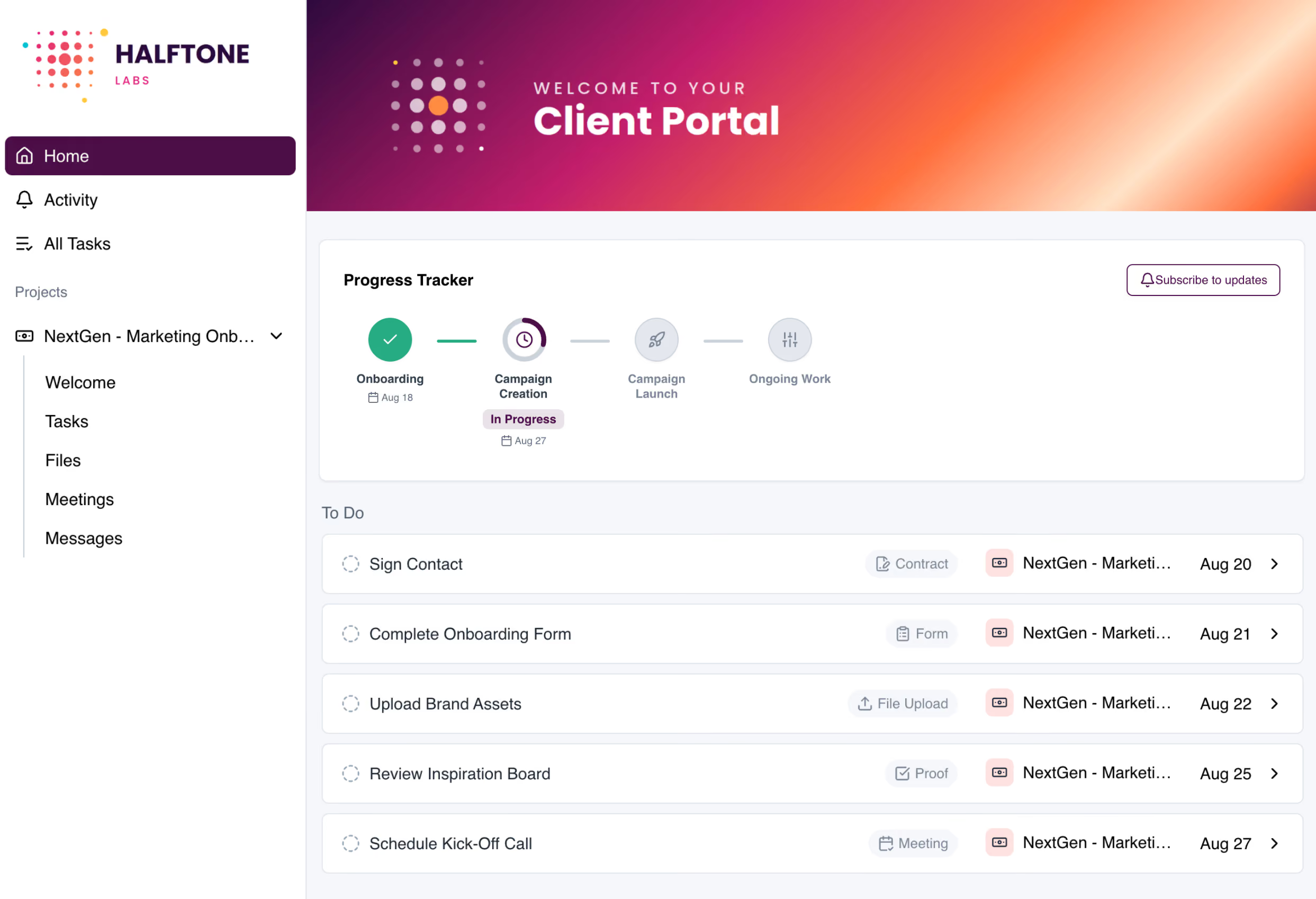
The only B, and its own AI faked its homework.
LaunchBay's AI task builder reproduced all 8 stages and 23 client tasks word for word in about 25 seconds. Dana got in without a password, and it was the only tool with both PDF e-signatures and an agency-signs-first signing order built in. Its weak spots were real, though. The AI form builder faked conditional logic with help text and fake repeating fields, and fixing it ate about 55 of the 105-minute build. A success message displayed as a red error, task dependencies require a paid tier, and stages can't repeat for monthly work. LaunchBay also has a design proofing tool with pinned comments, version history, and team-only replies inside client threads, but Claude didn't use it during this build, and Stripe payments weren't connected.
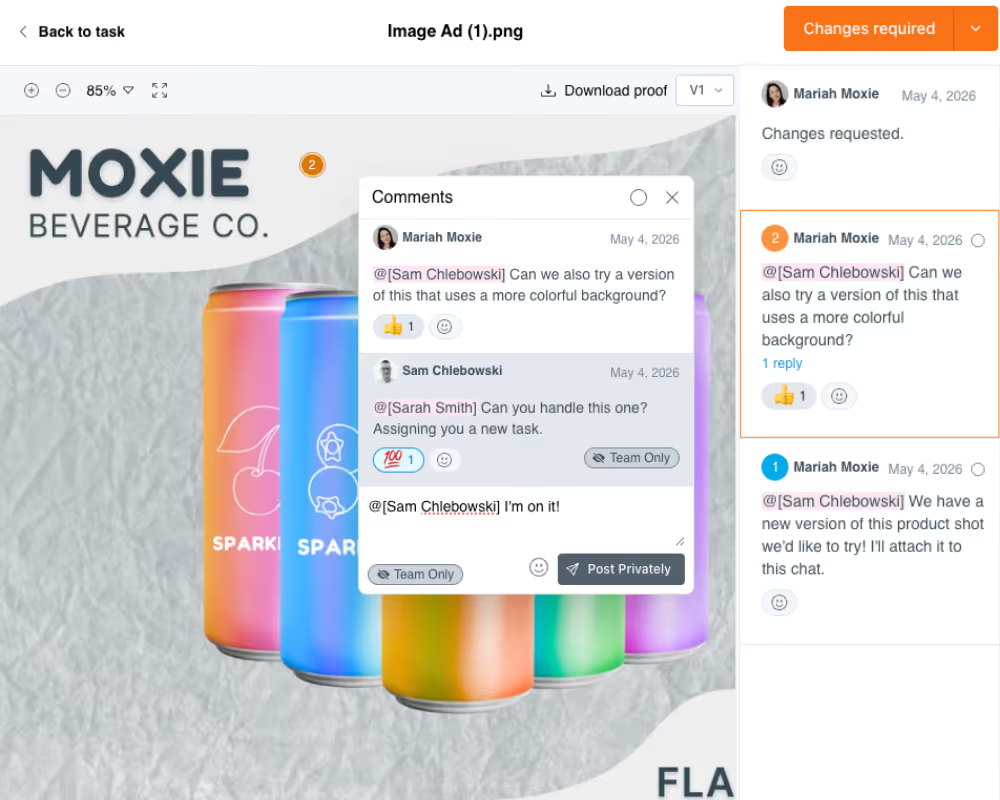
LaunchBay's proofing view: team-only comments stay hidden from the client in the same thread. Product screenshot, not captured during the test.
<TL;DR>
LaunchBay scored highest in this test, but the AI form builder faked logic it should have built for real, and that's the fix we're prioritizing first.
Try LaunchBay free →5 Things We Learned About Client Portal Software
The biggest lesson: most tools look fine from the admin side and fall apart in the client's view.
1. Money and sign-offs are where portals break. Four of seven tools had no native way to collect an online payment in the portal. Only LaunchBay supported a contract where the agency signs first, built in. LaunchBay has built-in design proofing with pinned comments and versions, but this test didn't exercise it. The other six either lacked it, needed a separate proofing tool, or kept it behind a paywall.
2. AI builders are fast and confidently wrong. LaunchBay's AI built 23 tasks in 25 seconds, then faked its form logic. Content Snare's AI went 0 for 6 on hiding internal fields. Dock's AI said it built six stages it never built. Use the AI to draft, then check every result in the client view.
3. The client view is where the grades were lost. From the backend, most builds looked reasonable. Logged in as Dana, she saw a dashboard saying "All caught up!" over 23 open tasks, a task list with no stages, internal checklists with a Mark as Done button, and her first step buried seventh.
4. Default content leaks to clients. Placeholder text, someone else's logo, a "© 2025 Acme" footer, and a canyon on a dental portal all made it to the client-facing side. Whatever you pick, log in as a test client before you invite a real one.
5. Recurring work is only half solved. Sydnee, SuiteDash, Rocketlane, and Assembly re-ran the monthly care plan inside the same portal cleanly. LaunchBay and Content Snare both needed workarounds. If your agency sells retainers, test this before you commit to any client onboarding software.
The Best Client Portal for Agencies, Intake, and More
We only made picks that the test actually measured; categories like "best for enterprise" or "best at scale" weren't tested, so they're not here.
| If You Need | Pick | Why, From the Test |
|---|---|---|
| A client portal for agencies | LaunchBay | The only B overall on an agency-workflow brief, with 16 of 20 capabilities built in. |
| Client onboarding end to end | LaunchBay | Highest weighted score (3.00 vs. 2.05 for second place). Stage progress, hidden internal tasks, passwordless login. |
| Contracts and e-signatures | LaunchBay | The only tool with PDF e-sign and an agency-signs-first order built in. SuiteDash and Assembly had e-sign without signing order. |
| Custom, bespoke processes | Content Snare | Conditions on fields, sections, and pages built a signing order and review gate, both confirmed from the client's link. |
| Client intake and questionnaires | Content Snare | Conditional questions stayed hidden until they applied, and table fields handled repeating data. |
| The cleanest mobile client view | Sydnee | A bottom tab bar, collapsible stages with task counts, and full-screen tasks on a phone-width screen. |
| Recurring monthly retainers | Sydnee, SuiteDash, Rocketlane, Assembly (tie) | All four re-ran the care plan inside the existing portal without touching onboarding. |
Limitations, and How to Check Our Work
This was one brief, one tester, and one build per tool, so treat the grades as a hands-on snapshot, not a verdict on every use case.
- We make one of the tools. LaunchBay ran this test and LaunchBay is in it. That's why our product's flaws are listed alongside everyone else's.
- Trial and free plans only. Features behind a paywall were scored from the vendor's own listings, not built. This mostly affected Assembly's forms, invoices, file collection, and proofing.
- Some things weren't verified. Dock's client view was never reachable. For LaunchBay, Stripe payments and design markup weren't connected or confirmed.
- Assembly needed a retest. A browser timeout cut the first session short. On the September 24 retest, our team built Stages 7 and 8, the care template, and the client invite by hand between sessions.
- Grades weren't cross-calibrated. Each tool was graded in its own session against the same rubric, not side by side.
- Pricing wasn't compared. Plans and prices change often; check each vendor's pricing page.
Every grade traces to a build log with screenshots. [TODO: link to the public scorecards and logs.]
Frequently Asked Questions
Everything you need to know about our client portal software test.


Get back to the work you're best at.
LaunchBay's AI-powered client portal handles the collecting, reminding, and following up, so your team spends less time chasing clients and more time delivering.
Ready to stop chasing?