.svg)
October 18, 2026
Use Your Saved Filters Inside Any Project
.png)
Part of our 31 Customer Improvements series, where we ship one feature our customers asked for every day this month.
Saved filters are how many teams run their day on the All Tasks page: "Overdue client tasks," "Client requests to triage," "Unassigned & due this week." Until now, those filters stayed on All Tasks. Inside a project, you had to rebuild them by hand.
Now your saved filters work in every project's task view too.
How it works
Open any project and go to Tasks. Next to Task Filters, you'll see the same Saved Filters button you know from All Tasks. Click it and pick any of your saved filters to apply it to that project's tasks.
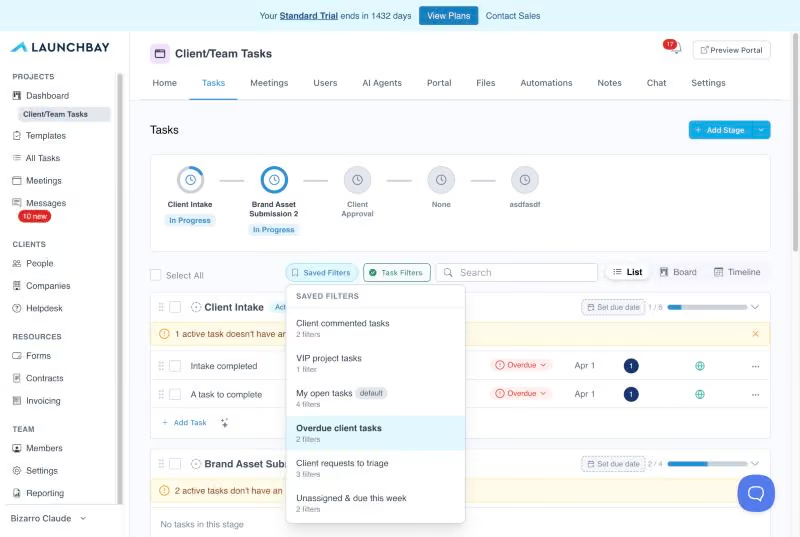
It's the quickest way to answer "what needs attention here?" on a single client implementation without leaving the project. It builds on the new quick filters we added to project task views earlier this week.
Managing your saved filters
You still create, edit, and delete saved filters from the All Tasks page. Any change you make there shows up everywhere you use that filter.
Tip: saved filters get even more useful when automations tag tasks for you. Save a filter for a tag like "At risk," and your automations keep it up to date automatically.
Have an idea for the next improvement? Reply to any of our emails or send it through the in-app chat. That's how this one got built.

