.svg)
Feb 13, 2026
HubSpot Client Portal: Why You Shouldn’t Use HubSpot (or Any CRM) as Your Client Portal
By
Sam Chlebowski
.avif)
Because client portals are a core part of LaunchBay, we get a version of the same question all the time:
“What’s stopping me from just using HubSpot as my client portal?”
It’s a fair question.
We use HubSpot internally. We like it. We recommend it. It’s one of the best CRMs on the market.
But we would never use it as a client portal.
Not because it’s impossible. It is technically possible. But because HubSpot was never designed to do the core jobs a real client portal needs to do, especially at scale.
That design decision matters more than most teams realize.
Does HubSpot Have a Client Portal?

Yes, HubSpot does have client-facing portal functionality.
There are two common ways teams try to create a HubSpot client portal:
- Using HubSpot’s native customer portal
- Using a third-party tool like Arrows and connecting it to HubSpot
Both approaches can work in narrow scenarios. Both also introduce limitations that become obvious as soon as onboarding, implementation, or delivery becomes repeatable and high-volume.
If you're searching for a CRM with a client portal, you're probably trying to avoid adding another tool. That instinct makes sense. But it often leads teams to stretch their CRM beyond what it was built to handle.
Why CRMs Like HubSpot Were Never Built to Be Client Portals
.avif)
Here’s the founder-level insight we’ve learned building LaunchBay.
Client portals exist to do three critical jobs:
- Streamline client information collection
- Enable structured collaboration
- Keep clients engaged and moving forward
Those jobs are foundational to scalable onboarding.
CRMs like HubSpot were designed to manage internal revenue workflows, not external execution workflows. Sales pipelines, lifecycle stages, and CRM objects optimize for tracking relationships, not guiding clients through work.
Because HubSpot was not originally designed as a client portal, it’s missing entire categories of functionality that onboarding-heavy teams rely on every day.
That gap is what teams eventually feel, even if things look workable at first.
Option 1: Using HubSpot’s Native Customer Portal
HubSpot’s native portal lives inside Service Hub and is primarily built for ticket visibility. Clients can log in, view support conversations, respond to tickets, and access knowledge base articles.
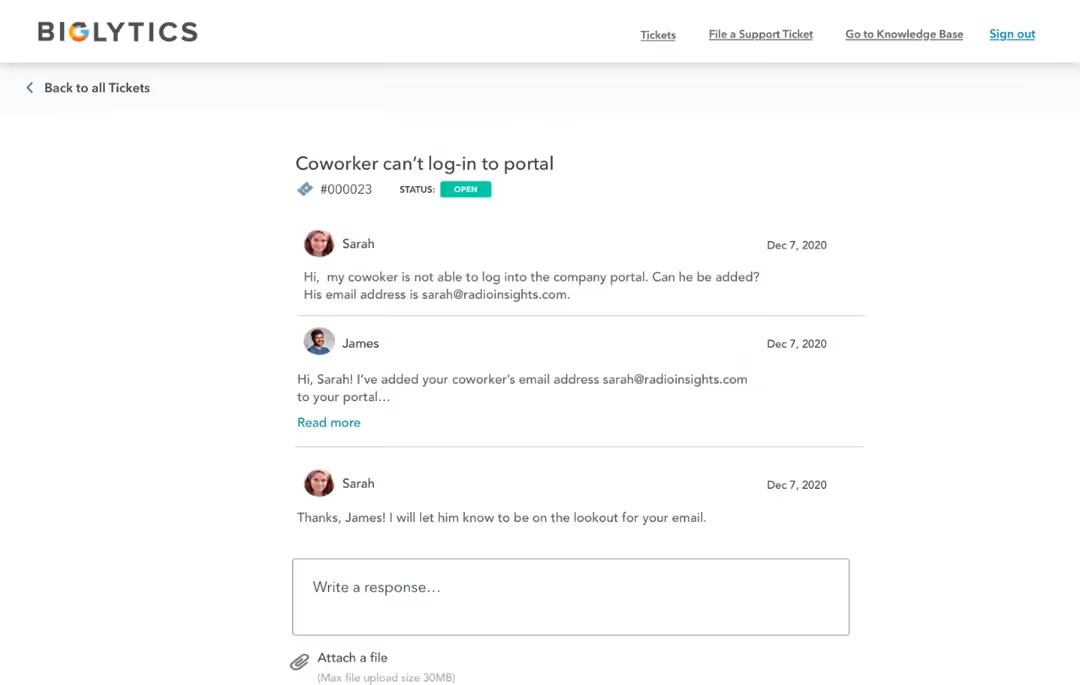
Where it struggles is structured onboarding and delivery. The portal is built around ticket objects, not onboarding flows. There are no guided task sequences, no structured milestone progression, and no built-in accountability mechanics designed to keep clients moving forward.
From a founder’s perspective, this is where teams start compensating manually. They add workflows, custom properties, internal tasks, and reminders to simulate onboarding structure. It works for a few clients. It breaks when volume increases.
You end up managing onboarding inside a system optimized for support.
Option 2: Using Arrows as a HubSpot Extension
Arrows is one of the most common third-party tools teams use to turn HubSpot into a client portal, but it is not a true portal. It's an extension of HubSpot.
Because Arrows only works with HubSpot, your onboarding infrastructure becomes tightly coupled to a single CRM. If you ever switch systems, you rebuild from scratch. Many features also require higher-tier HubSpot plans, increasing long-term costs while limiting flexibility.

More critically, the entire experience is still driven by CRM architecture. Plans are tied to records, structure is triggered by pipeline stages, and automation depends on CRM workflows. The portal is layered on top of revenue infrastructure rather than operating as an independent execution environment.
This may work for lightweight onboarding, but as delivery becomes more complex, friction surfaces quickly. Visibility lives inside CRM reports, workflows are constrained by CRM logic, and onboarding operations end up split across systems.
Where the Breakdown Happens
Whether teams use HubSpot’s native portal or a CRM extension like Arrows, the same friction eventually appears.
1. Information Collection Becomes Fragmented
Onboarding requires structured data collection: assets, approvals, forms, credentials, requirements.
Inside a CRM-based portal, this often becomes a mix of custom properties, scattered forms, email threads, and internal notes. There is no single guided experience for the client.
Clients begin asking, “What exactly do you need from me?”
That question is a signal that structure is missing.
2. Collaboration Is Not Fully Structured
CRMs track relationships. They do not manage execution.
They do not naturally handle client task dependencies, approval workflows, milestone visibility, or execution accountability. Teams compensate with manual follow-ups, Slack nudges, and recurring reminders.
It works, but it is fragile.
As client volume increases, so does operational strain.
3. Engagement Gradually Drops
This is where churn risk quietly increases.
Without clear next steps, visible progress, and structured accountability, onboarding slows. Activation timelines stretch. Clients disengage.
From a founder’s perspective, this is not a tooling issue. It is a systems issue.
Onboarding momentum requires intentional design. CRMs were not designed for that.
Why Software Companies Shouldn’t Use HubSpot as a Client Portal
For software companies, onboarding is where retention is earned or lost.
Time to first value matters more than CRM cleanliness.
When onboarding lives inside HubSpot:
- Implementation progress gets buried in deal stages
- Clients see sales context instead of activation guidance
- Onboarding teams inherit CRM complexity they do not need
We have seen this slow activation and increase churn risk, even when teams believe they have configured everything correctly.
LaunchBay separates sales context from onboarding execution while integrating directly with HubSpot. Your CRM remains your system of record. Your onboarding becomes a system built to drive value.
Why Agencies Shouldn’t Use Their CRM as a Client Portal
Agencies often default to their CRM because it feels convenient.
But delivery friction does not come from lack of tools. It comes from lack of structure.
CRMs do not manage client task dependencies, asset collection, approval workflows, or structured delivery timelines. They track relationships, not execution.
A purpose-built client portal gives agencies a shared operating system where clients and teams know exactly what is next, without exposing internal CRM complexity or forcing clients into systems that were not built for them.
CRM Integration vs a Standalone Client Portal
The most scalable setup is not choosing between a CRM and a client portal.
It is pairing them.
HubSpot should manage revenue data, contacts, and lifecycle stages. A client portal should manage execution.
With LaunchBay, you can automatically create a client portal when deals close, pass key information from HubSpot into onboarding workflows, and sync relevant updates back into your CRM.
HubSpot stays clean. Delivery stays structured. Clients get clarity.
What a Real Client Portal Needs to Support
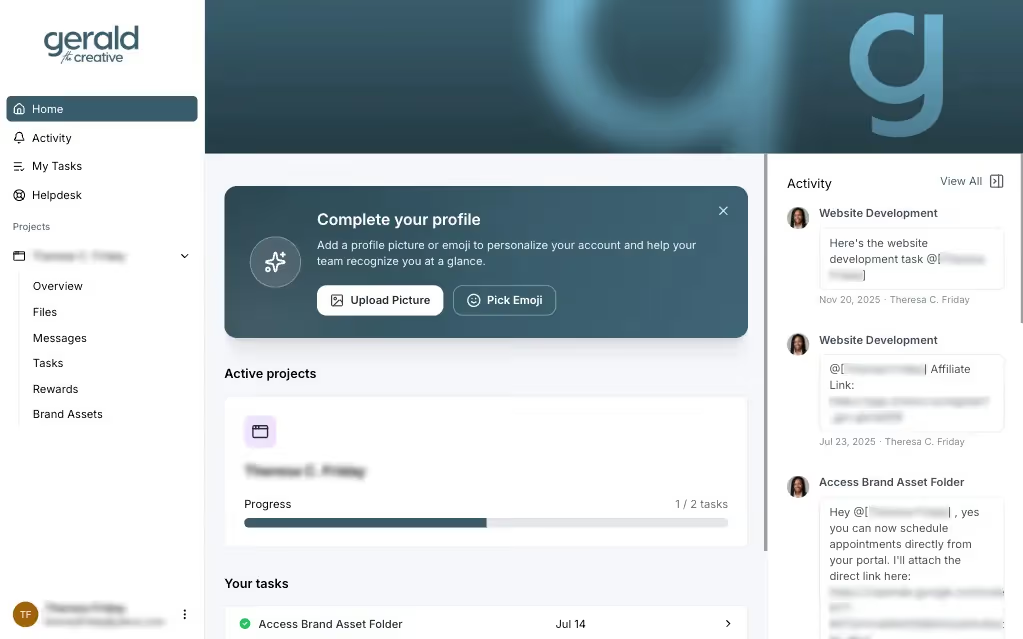
After working with hundreds of onboarding and implementation workflows, we’ve seen a clear pattern.
A real client portal is not just a place to “view updates.” It is the system that drives execution.
To scale onboarding without adding headcount, a client portal must support:
- Automated client follow-ups that keep momentum without manual chasing
- Structured client tasks and checklists tied to milestones
- Flexible forms for collecting information at the right stage
- Deep integrations with your CRM and project tools
- Full white-label branding that reinforces your professionalism
- Easy client access, including loginless options
- Adaptability across onboarding, implementation, and ongoing delivery
These capabilities are not add-ons. They are foundational to scalable operations.
CRM-based portals consistently fall short because they were never designed to manage execution across the full client lifecycle.
LaunchBay was built specifically to handle these workflows in one unified, client-facing workspace. It integrates with your CRM, aligns your internal teams, and gives clients a structured, frictionless experience from kickoff through completion.
That is the difference between a workaround and real infrastructure.
Final Thoughts
If you’re searching for a HubSpot client portal or a CRM with a client portal, you’re trying to simplify your stack and improve client experience. But forcing your CRM to act as a client execution engine creates friction as you scale. You don’t need a workaround, you need a real client portal, and that’s exactly what LaunchBay was built to deliver.


Get back to the work you're best at.
LaunchBay's AI-powered client portal handles the collecting, reminding, and following up, so your team spends less time chasing clients and more time delivering.
Ready to stop chasing?