.svg)
Jul 30, 2026
LaunchBay vs. the Field: Best MCP for Customer Onboarding and Implementation
By
Sam Chlebowski
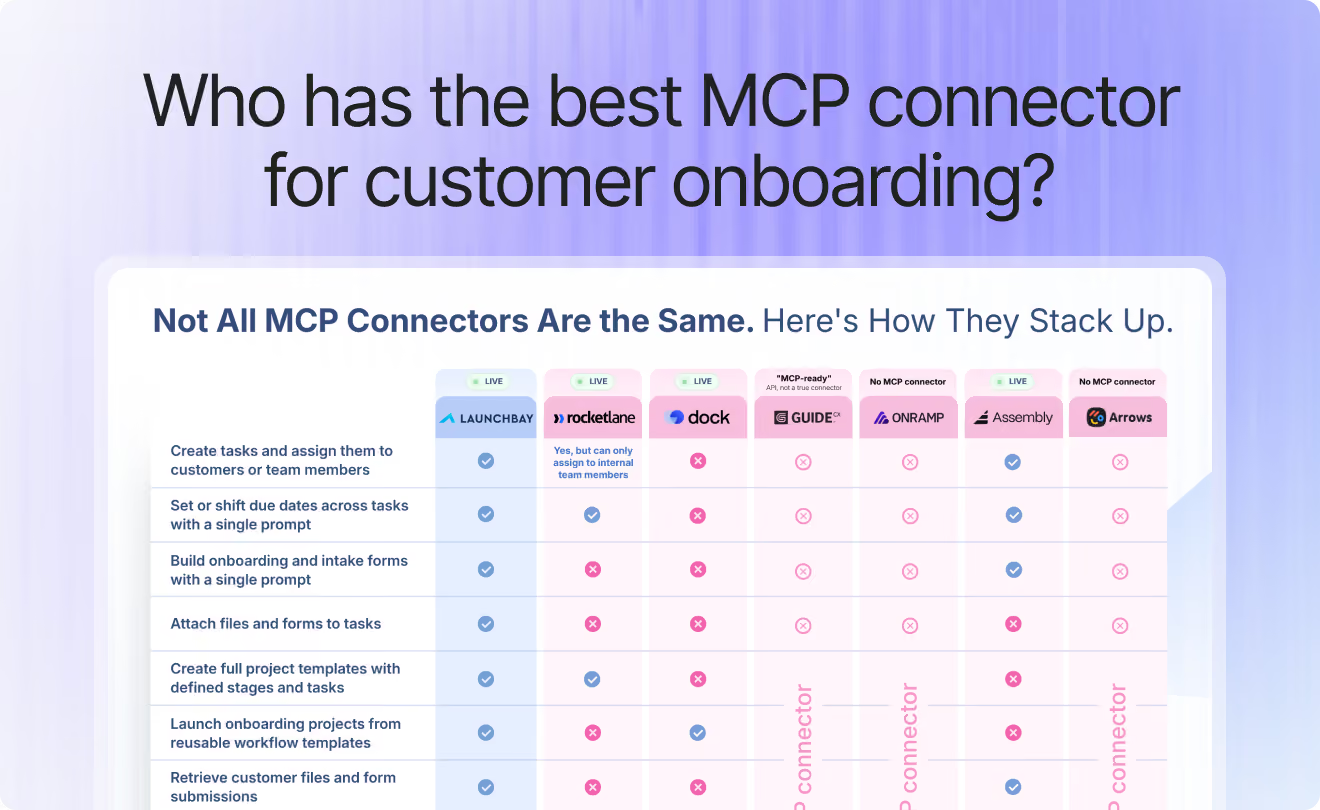
At LaunchBay, we've prided ourselves on saying we have the best MCP of any customer onboarding platform.
But this isn't just fluff: before making that claim, we actually looked into it.
We did a deep dive on our competitors' software, breaking down what tools were available in their MCPs, and more importantly, the ways you could actually use them for onboarding and implementation.
This post breaks down our full research and everything we learned, and explains where LaunchBay stands against six other platforms teams consider for customer onboarding automation and implementation: Rocketlane, Dock, GuideCX, OnRamp, Assembly, and Arrows. We'll cover what each one offers, where it's strong, where it falls short, and why LaunchBay is still the best MCP for customer onboarding.
What Is MCP for Customer Onboarding and Implementation?
MCP (Model Context Protocol) is the standard that lets an AI assistant like Claude or ChatGPT connect to a piece of software and actually take action inside it, not just talk about it. For a business built on customer onboarding and implementation, that's a big deal: a project manager can build a customer's onboarding project, attach forms, assign tasks, and pull back what the customer submitted, all from one conversation instead of a dozen screens.
Not every onboarding tool has built one. This post breaks down which ones have, and how they compare.
Master Breakdown
Here's the state of MCP across all seven platforms, at a glance.
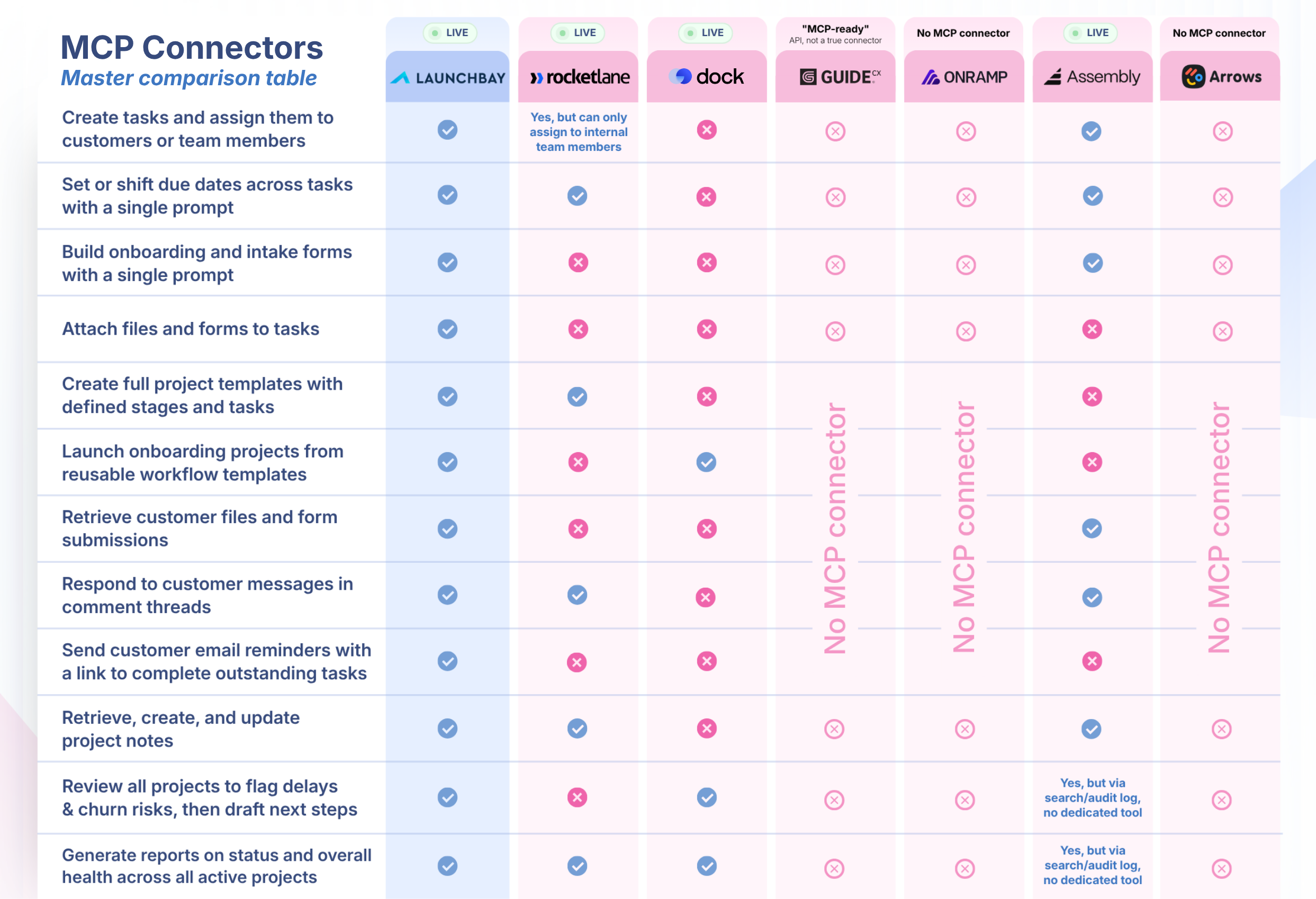
Two things stand out: LaunchBay ships more tools than any competitor with a working MCP (33, versus RocketLane's 24), and half this list doesn't have a real, connectable MCP at all. "AI-ready" marketing language shows up more than once below, worth reading closely before you take it at face value.
LaunchBay vs. Rocketlane
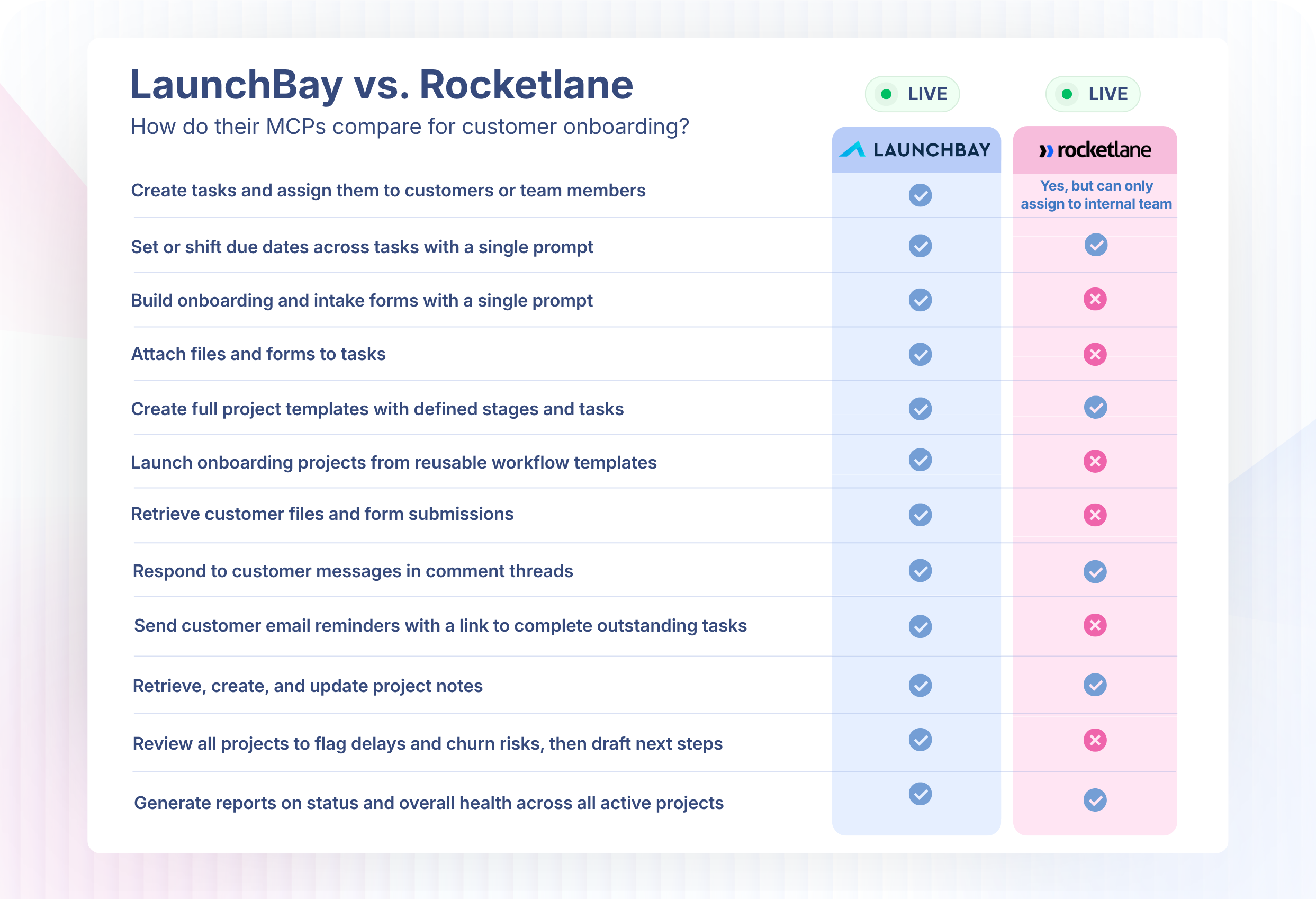
Where Rocketlane is strong: Rocketlane hit General Availability for its MCP on July 3, 2026, with 24 tools, real reporting capabilities, and one of the only public tool guides with example prompts in this comparison. It's the closest match to LaunchBay on this list, but still misses pieces built specifically for onboarding.
Tool depth: Rocketlane's 24 tools cover the machinery of a professional-services automation platform: profile, project, task, phase, and time-entry data. LaunchBay's 33 skew toward what onboarding teams actually run day to day.
Where Rocketlane falls flat: Rocketlane is built as a professional-services automation platform first, with onboarding as one piece of a broader tool. Its MCP reflects that: no health-score tool, no loginless customer reminders, no per-task customer assignment, and no decision logging. Its customer tasks also rely on plain text fields and attachments, with no integrated signing or proofing, so customers get pushed to outside tools to do the work.
Why LaunchBay wins: LaunchBay's MCP tools are built around what onboarding teams do constantly: pull health scores, send loginless customer reminders, assign customers to individual tasks, and log decisions with a full audit trail, none of which Rocketlane's MCP supports. The gap shows in the product too: Rocketlane's customer tasks are limited to text and attachments, while LaunchBay's bundle signing, files, forms, and embeds directly into the task.
Learn more about why LaunchBay is the best Rocketlane alternative →
LaunchBay vs. Dock
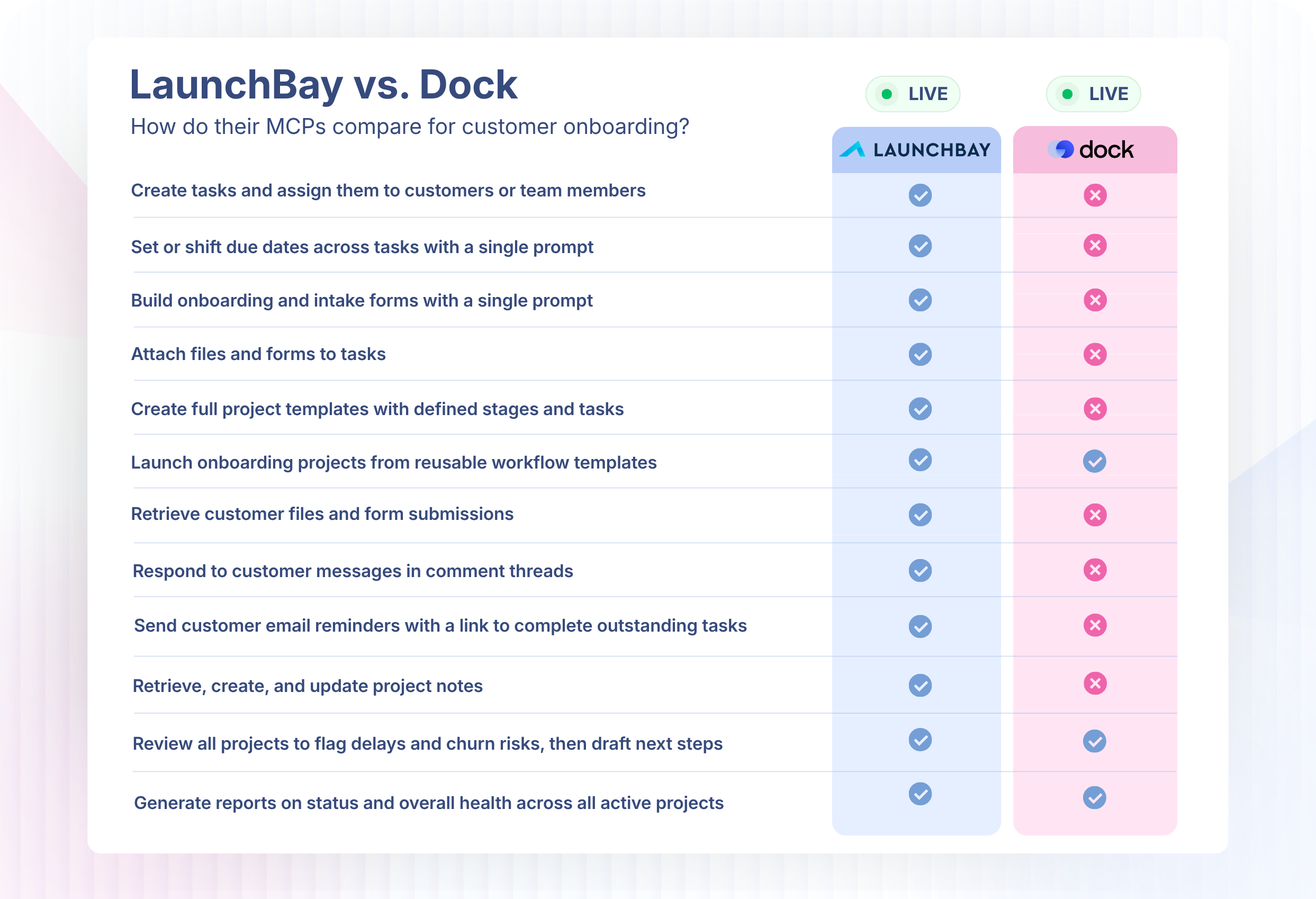
Where Dock is strong: Dock's MCP requires human approval before any action executes, a smart safety default baked into how it works. It also handles creating projects from templates and bulk tagging or archiving, both things LaunchBay supports too.
Tool depth: Dock doesn't give you a list of tools, it routes every request to a pre-built or custom AI agent, and the agent decides what to do. No "create task" or "find projects" tools, just an outcome and an agent you're trusting to handle it. The agents can do real work, but there's no documented list of what they can and can't do, and building a custom one for anything Dock hasn't pre-built takes real setup first.
Where Dock falls flat: Dock is built around sales and deal rooms first, with onboarding layered on top, and its MCP reflects that: no health-score tool, no loginless customer nudge, no task-level customer assignment, no decision logging with an audit trail, no custom intake form builder, and no task-level commenting. The gap holds outside the MCP too: no native e-signatures, no design proofing, no structured customer service forms, no time tracking, and no centralized inbox. Communication relies on threaded comments or a Slack integration users report disconnects frequently.
Why LaunchBay wins: LaunchBay's tool set goes considerably deeper on the workflows onboarding and implementation teams run day to day: health scoring, customer-facing reminders that don't require a login, per-task customer assignment, and a real audit trail on decisions, on top of native signing, proofing, and time tracking that Dock's customers have to leave the platform to get elsewhere. LaunchBay also ships new MCP capability roughly every week or two. Dock's MCP has moved at a comparable early pace (beta since June 18) but hasn't yet matched that cadence of continued releases.
Learn more about why LaunchBay is the best Dock alternative →
LaunchBay vs. GuideCX
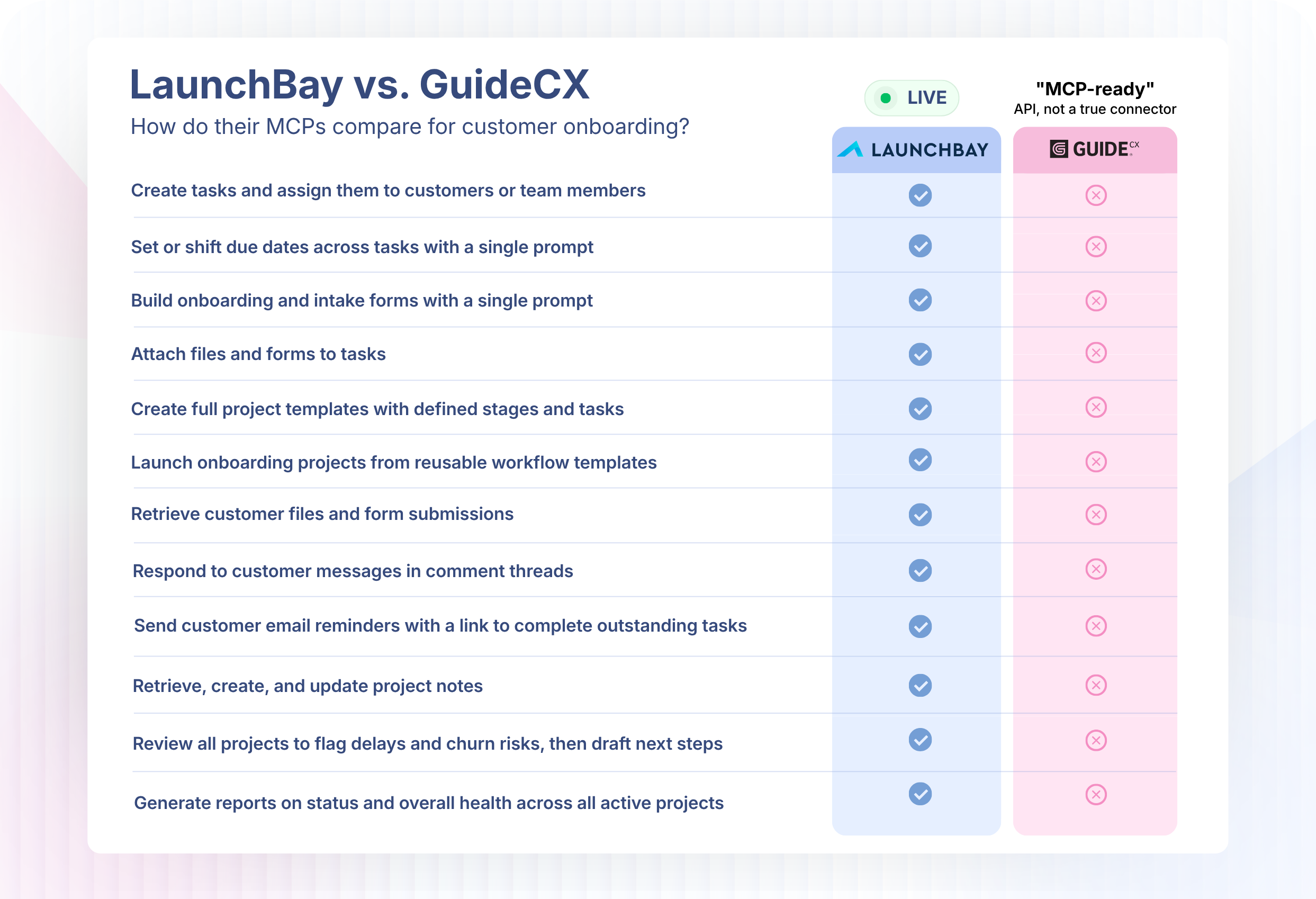
GuideCX doesn't have a real, connectable MCP server. It describes itself as "MCP-ready" through a schema-aware analytics API, but there's no published server URL, setup guide, or documented tool list, the hallmarks of an actual MCP connector. Its AI investment (Tempo AI: health scoring, forecasting, task dispatch) is real, but it lives inside GuideCX's own app, not accessible to an outside AI assistant.
Why LaunchBay wins: LaunchBay has a working MCP today, with 33 documented tools an AI assistant can actually call. GuideCX has marketing language and an internal AI feature, not something your team's AI assistant can connect to. That gap extends past MCP into the product itself: GuideCX has no native file proofing (customers can upload files but can't annotate or approve them inline), no real e-signature flow, and no native live chat in its portals, all things LaunchBay handles natively.
Learn more about why LaunchBay is the best GuideCX alternative →
LaunchBay vs. OnRamp
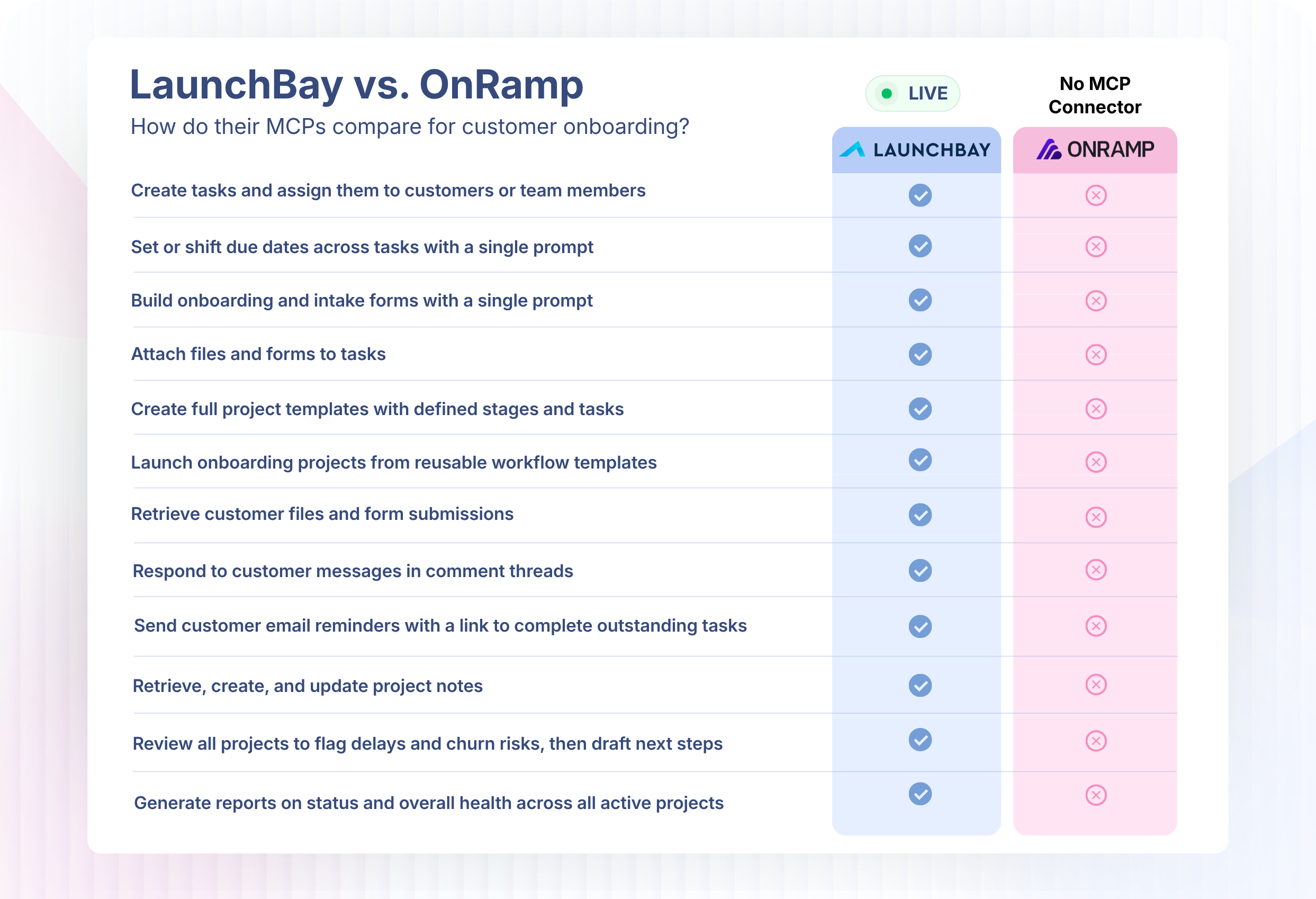
OnRamp doesn't offer an MCP connector. It has an in-platform agentic AI engine called Aero, but nothing an external AI assistant can connect to.
Why LaunchBay wins: Beyond having a working MCP where OnRamp has none, OnRamp starts at $15,000, with everything past that behind a custom quote. The account requirement compounds it: OnRamp requires a password or six-digit code every time a customer returns, where LaunchBay's customers click a magic link. OnRamp's communication also stays limited to in-task threads with no centralized inbox, and its automation has to be configured task-by-task rather than once at the template level. Both are places LaunchBay's platform does more with less setup.
Learn more about why LaunchBay is the best OnRamp alternative →
LaunchBay vs. Assembly
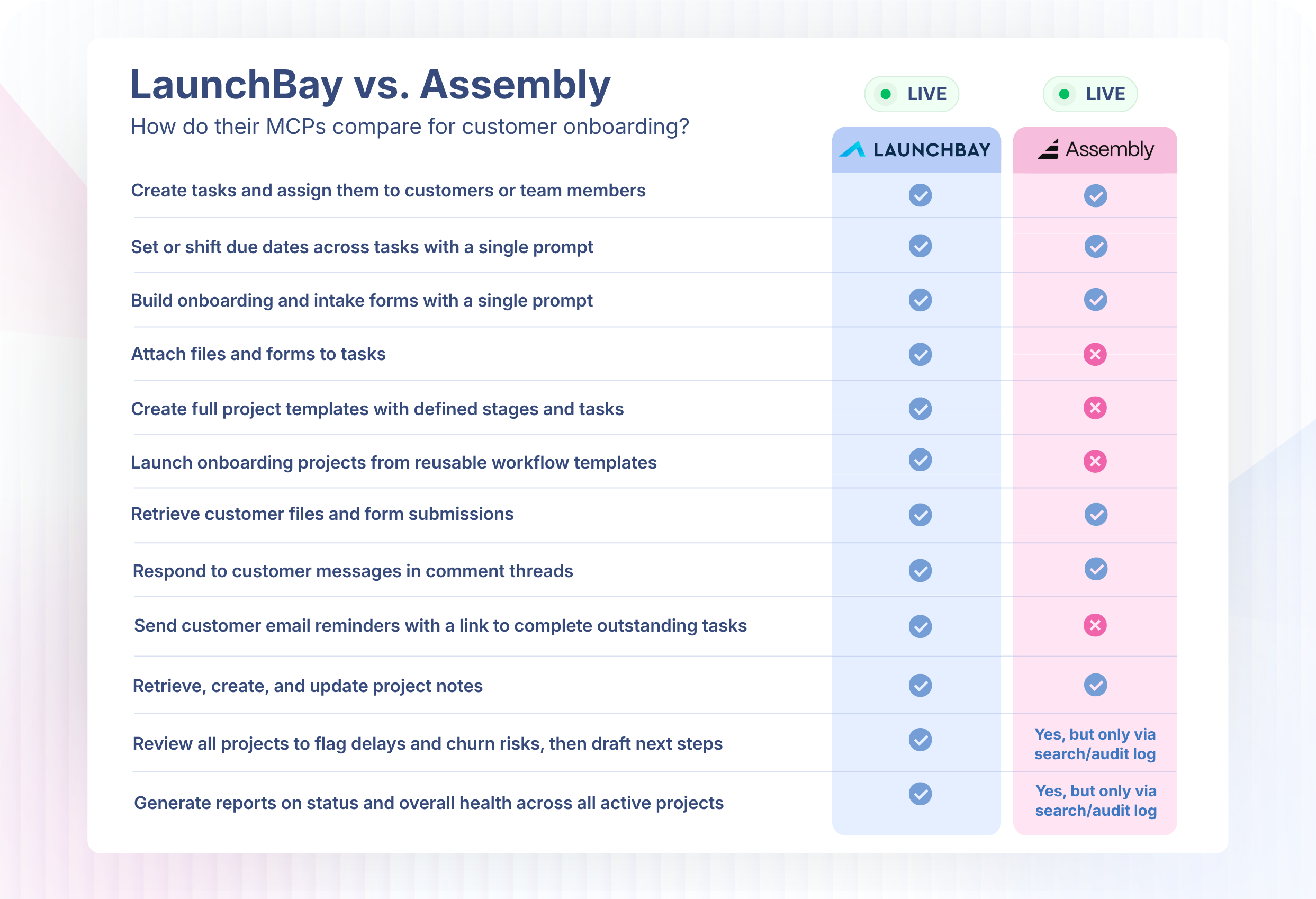
Where Assembly is strong: Assembly rolled out a real, working MCP server in beta on July 17, 2026, open to any workspace admin. And once you look at what it actually covers, it's the deepest MCP connector of any software company in this comparison: read and write access across clients, companies, tasks, notes, forms, files, invoices, contracts, messages, and more, plus a full audit log.
Tool depth: On the surface, Assembly looks like it stacks up to LaunchBay, but that's misleading: its MCP is built for other platforms to tie into Assembly, not to hand your AI assistant tools already built to do the job. There's no tool for pulling health scores, sending a customer a reminder, logging a decision with an audit trail, or attaching a custom form to a task, the workflow-specific actions LaunchBay's tools are built around from the ground up.
Where Assembly falls flat: Assembly's customer tasks rely on a third-party app with only basic fields (title, description, embed), with no way to attach forms, contracts, or file proofs directly. Its automations are single-step with no conditional logic. Customer access requires an account and login, no magic-link option. Unlimited portals are gated to higher tiers. And its MCP is admin-only, restricted to workspace admins rather than usable across a broader team, and still in beta.
Why LaunchBay wins: LaunchBay's MCP is built specifically for onboarding workflows, with 33 dedicated tools covering health scores, loginless customer nudges, custom form building, decision logging, and more, not a generic wrapper around an existing API. That same gap shows up in the core product: LaunchBay's customer tasks bundle forms, contracts, and file proofs directly, with native design proofing and multi-step automation Assembly doesn't have, plus loginless customer access on every plan.
Learn more about why LaunchBay is the best Assembly alternative →
LaunchBay vs. Arrows
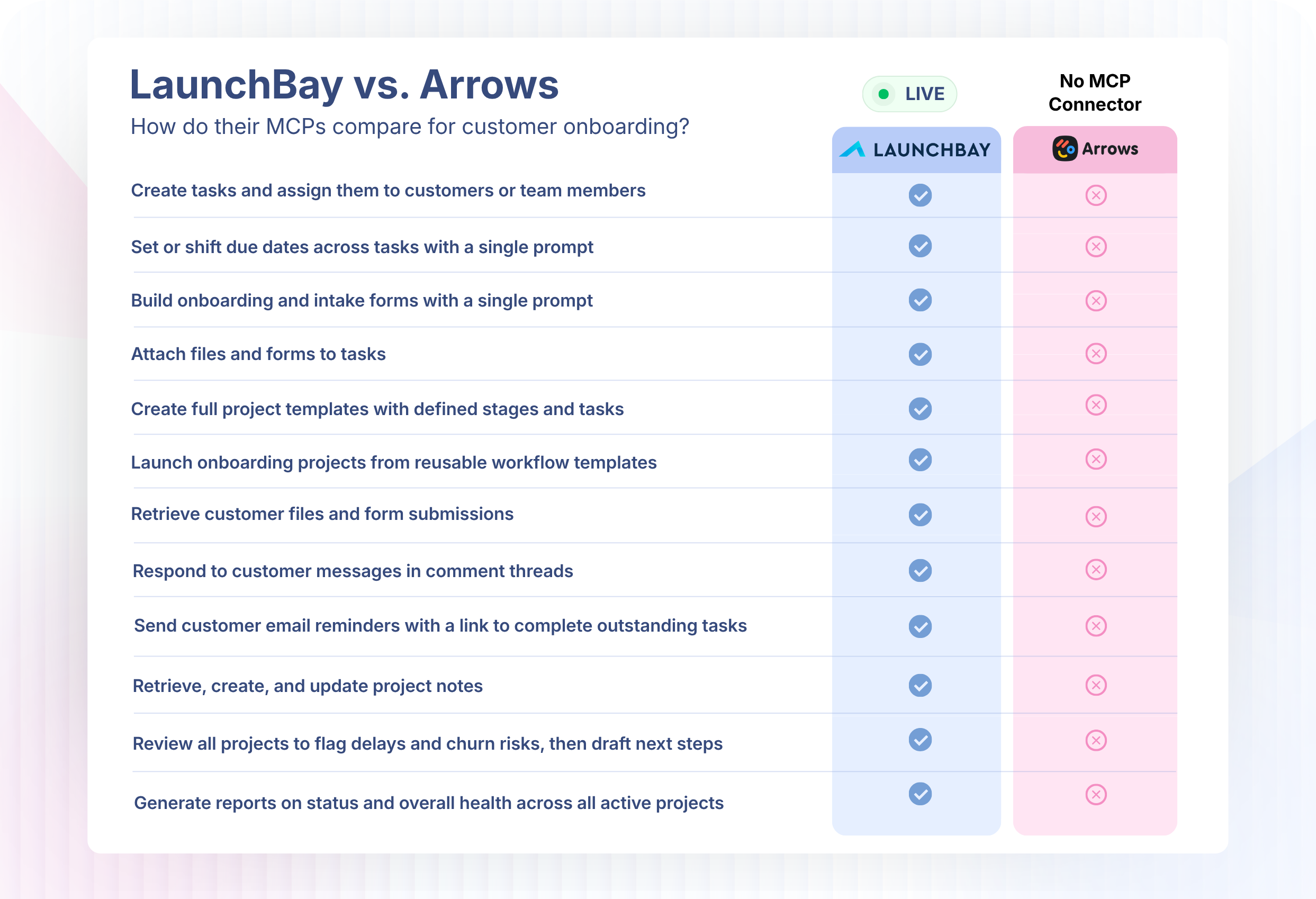
Arrows is a HubSpot-native sales-room and onboarding tool, but it has no native MCP connector exposing its own product data. It does distribute "Arrows Sales Skills," a free Claude connector, but that's a set of prompt workflows reading from your own CRM, email, and calls, not a way to access Arrows' own onboarding plans or sales rooms. The one indirect path is through HubSpot's own MCP server, which can reach Arrows-synced data, but only where it lives on standard HubSpot objects, not custom ones.
Why LaunchBay wins: LaunchBay's MCP connects directly to LaunchBay's own onboarding data. No indirect bridge, no dependency on how a second platform syncs fields. That mirrors a bigger structural advantage: LaunchBay is CRM-agnostic, working with HubSpot, Salesforce, Pipedrive, or anything else, while Arrows only works if HubSpot is your system of record and locks you into rebuilding onboarding entirely if you switch. Arrows also splits work across two systems (your team in HubSpot, customers in Arrows), where LaunchBay keeps everything in one place.
Learn more about why LaunchBay is the best Arrows alternative →
Why LaunchBay Has the Best MCP for Onboarding and Implementation
LaunchBay is built for one thing: customer onboarding and implementation. Not professional-services automation with onboarding as an afterthought (RocketLane). Not a sales tool that grew into onboarding (Dock, Arrows). Not a general customer-portal platform wrapping its existing API (Assembly). LaunchBay was built from day one to get a new customer set up, informed, and active, and every tool in its MCP connector reflects that focus.
A few reasons LaunchBay leads specifically on MCP:
We ship new MCP tools almost every week. This isn't a quarterly release train. Check our changelog for the latest updates, and join our weekly livestreams for real workflow walkthroughs as new capability ships. See our events page for upcoming sessions and recordings.
We have more MCP tools than anyone else in this category. 33 tools, more than RocketLane's 24 and more than any other platform in this comparison with a working MCP at all. See the full tool list for exact detail.
We're built for onboarding and implementation specifically. We know your team doesn't live in LaunchBay alone; you're running a CRM, a project management tool, maybe both. Our MCP moves information between LaunchBay and whatever else your team already uses, so an AI assistant can bridge the gap without anyone connecting things by hand.
We back it with real people, not just documentation. Every LaunchBay plan includes 1:1 support from our team through our support desk, and every week we run a live training session streamed to YouTube, LinkedIn, Facebook, and Instagram, covering real workflows, not just feature announcements. Follow our YouTube channel to get notified when we go live next, or catch up on any recording you missed.
If you're onboarding customers and using AI anywhere else in your business, the question isn't whether an MCP connector is worth having for customer onboarding automation. It's why you'd choose one that's slower to ship, narrower in scope, or bolted onto a tool that wasn't built for this job in the first place.
See LaunchBay in Action
If your team is running customer onboarding and implementation across spreadsheets and email threads, LaunchBay gives you a single place to run every onboarding from closed deal to activated customer.
Schedule a 1:1 demo and we'll show you exactly how it works for your business. Or start a free 14-day trial and explore on your own. No credit card required.


Get back to the work you're best at.
LaunchBay's AI-powered client portal handles the collecting, reminding, and following up, so your team spends less time chasing clients and more time delivering.
Ready to stop chasing?