.svg)
October 20, 2026
Know When an Automation Is Broken Before Your Client Does
.png)
Part of our 31 Customer Improvements series, where we ship one feature our customers asked for every day this month.
Automations are only as good as the things they point to. An automation that says “when the brand questionnaire is completed, activate the homepage mockup review” works great, right up until someone cleans up the template and deletes the questionnaire task.
Until now, that automation would sit there quietly. It still showed up in your list, it still looked fine, and it would never fire again. You’d usually find out when a client asked why their next step never showed up.
Now LaunchBay tells you.
What’s new
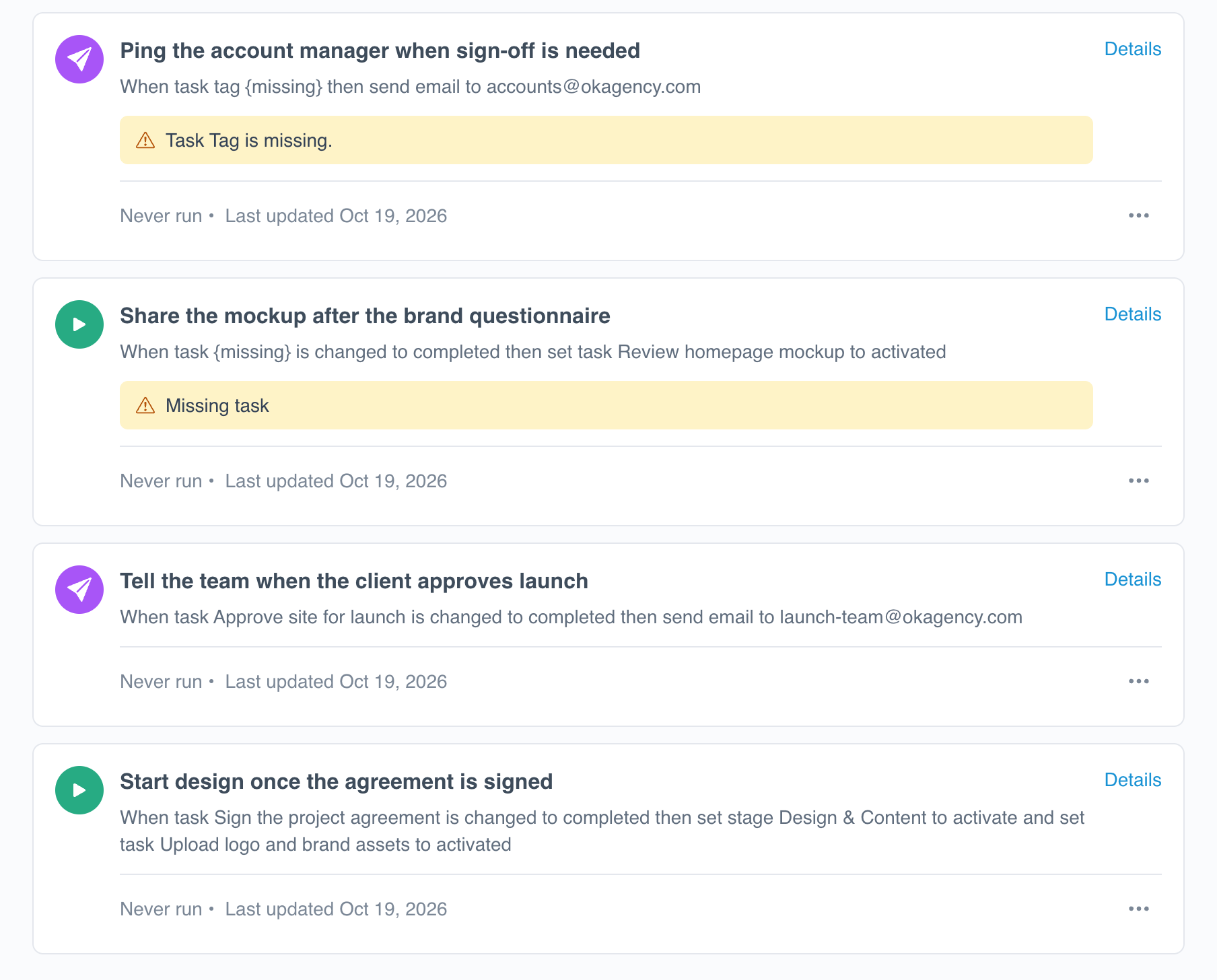
When something an automation depends on is deleted or can’t be found, its card on the Automations tab shows a yellow warning naming what’s missing, like Missing task or Task Tag is missing.
The automation’s description changes too. Where it used to show the item’s name, it now shows {missing}, so you can see exactly which part of the rule broke:
When task {missing} is changed to completed then set task Review homepage mockup to activated
Healthy automations look exactly the same as before, so the broken ones stand out at a glance.
What LaunchBay checks
Warnings cover everything an automation can trigger on or act on:
- Tasks and stages
- Client portal pages
- Meetings
- Forms and form fields
- Task tags and project tags
This works in both projects and templates. Templates matter most, because a broken automation in a project template gets copied into every new project you create from it.
How to fix a broken automation
- Open the project or template and go to the Automations tab.
- Look for cards with a yellow warning.
- Click Details, then point the trigger or action at a new task, tag, or field, or delete the automation if you no longer need it.
LaunchBay also asks you to confirm before you delete a task an automation uses. Editing templates through your AI assistant? It already warns you before deleting a task or stage an automation depends on, so fewer automations break in the first place.
Why it matters
Automations keep projects moving without babysitting. They activate the next task, open the next stage, and let your team know when a client signs off. When one breaks silently, the project stalls, and nobody notices until a deadline slips on a client implementation.
With warnings, you’ll know as soon as something breaks. Fix it in a few seconds, and your clients won’t notice a thing.
Head to the Automations tab on any project or template to check yours.

