.svg)
Jan 20, 2026
What Is B2B Client Onboarding? Why Most Teams Get It Wrong
By
Sam Chlebowski

If your team is drowning in onboarding chaos (spreadsheets, email threads, constant follow-ups), you’re not alone.
I’ve been there.
I joined a marketing tech startup, Brighter Vision, as employee #3 and helped scale it from ~250 to 5,000+ customers, leading sales, marketing, and customer success along the way.
The biggest lesson I learned is simple:
If you can’t consistently onboard clients on a predictable timeline, you can’t scale.
At every stage of growth, client onboarding was the bottleneck. And that’s because it was treated as a set of tasks rather than as a system the business could rely on.
In this article, I’ll explain why most B2B onboarding falls apart as teams scale and how to rethink onboarding as operational infrastructure rather than a checklist.
What B2B Teams Get Wrong About Client Onboarding
Ask most B2B teams what client onboarding is, and you will usually hear some version of this:
- Collecting contracts, forms, files, and access needed to start work
- Completing an internal checklist of setup tasks
- Hosting kickoff calls and client walkthroughs
- Getting the client live by launching a deliverable or finishing implementation
All of these are part of onboarding. But they are not the whole picture.
And treating onboarding this way becomes a serious problem as your business scales.
The Problem With the Traditional View of B2B Client Onboarding
When onboarding is reduced to task lists, emails, spreadsheets, or a short phase at the start of a project, teams miss its real purpose. Onboarding is not just administrative setup. It is core operational infrastructure.
Viewing onboarding as a lightweight or one-time step creates predictable breakdowns as client volume grows.
Here is where most B2B teams get stuck:
#1. Onboarding Is Treated as a One-Time Task, Not a System
For many teams, onboarding looks like:
- Spreadsheets listing tasks that must be manually completed and checked off
- Long email threads outlining forms, files, and contracts clients need to send
- A single project status like “In Progress” or “Onboarded” with little visibility into what is actually happening
At first, these improvised workflows feel good enough. But as volume grows, onboarding becomes dependent on people remembering what to do next and reminding others to do the same.
That kind of manual coordination does not scale. It introduces delays, increases the risk of human error, and creates a frustrating experience for both your team and your clients.
#2. Manual Processes Slow Down Time to Value
Email threads, spreadsheets, and one-off documents can work when client volume is low. They break quickly as volume increases.
Details get missed. Follow-ups are forgotten. Information lives in different places. Progress stalls while teams wait on clients to complete tasks.
From the client’s perspective, onboarding feels slow and disorganized. Delays between contract signature and real value create frustration, doubt, and churn risk before the relationship even gets started.
#3. Ownership Is Fragmented Across Teams
In most B2B organizations, onboarding is split across teams. Sales owns the deal. Operations owns setup. Delivery owns execution. Customer success owns retention. But no one owns the full onboarding journey.
Without a shared system of record, context gets lost during handoffs. Clients are asked the same questions multiple times. Internal teams waste time searching for files, notes, and decisions.
What is often labeled a communication issue is almost always a coordination problem.
#4. Tools Are Not Designed for Cross-Functional Onboarding
Most teams try to run onboarding through tools that were never designed for it. They close the deal in a CRM, deliver work in a project management tool, and fill the gaps with email or Slack.
Each tool works well on its own. The problem is that none of them is built to coordinate onboarding end to end, especially when the client is actively involved.
As a result, onboarding is spread across systems. Information is scattered, updates are not synchronized, and no one has a clear, real-time view of where a client stands.
#5. Early Success Is Poorly Defined
One of the most common mistakes teams make is failing to agree on what successful onboarding actually means.
For some teams, onboarding is done once setup is complete. For others, it ends after implementation. And in many cases, no one can clearly answer the question at all. The result is always the same.
Onboarding drags on. Teams stay busy. But customers are not confident they are getting value yet. Setup is not success. Outcomes are. If customers do not experience a clear first win early, engagement drops fast.
#6. The Onboarding Process Does Not Scale With Growth
Most onboarding processes are built one client at a time. Each new customer gets a slightly customized version of the process, adjusted manually for their needs, timeline, or edge cases.
Personalization is good customer service. But not everything needs to be customized.
For example:
- How information is collected
- How tasks are assigned across teams
- How progress is tracked and communicated
- How handoffs happen between sales, delivery, and operations
These are operational problems. When they are reinvented for every client, onboarding becomes harder to manage as volume increases.
At scale, this approach becomes impossible to sustain.
What Is B2B Client Onboarding, Really?
To fix onboarding, teams need a clearer definition of what it actually is.
While the specific steps of onboarding vary by business, the underlying concept should hold across industries. Without that shared understanding, onboarding inevitably collapses into checklists, spreadsheets, and ad hoc coordination.
B2B client onboarding is the system that moves a customer from closed won to value delivered in a predictable, repeatable way.
It is the moment when a customer transitions from buying a promise to experiencing real outcomes.
That system extends far beyond collecting information or completing setup tasks.
True B2B client onboarding includes:
- A structured handoff from sales to operations, delivery, or customer success
- A guided client experience that clearly shows where to go, what to do, and what happens next
- Real-time visibility into progress for both internal teams and clients
- Defined approval points for deliverables and launch readiness
- Validation that implementations or configurations actually meet client needs
- Post-launch follow-up so account and customer success teams retain full context
Most importantly, onboarding is not owned by a single team. Sales, operations, delivery, leadership, and the client are all part of the same system.
That is exactly why onboarding breaks when there is no shared platform connecting them.
What Does Scalable B2B Client Onboarding Look Like?
When onboarding is treated as core operational infrastructure instead of a short setup phase, teams onboard faster, reduce churn risk, and scale client volume without adding headcount.
Below are practical examples of what scalable B2B client onboarding looks like in action.
#1. Centralize Onboarding in One Shared Portal
A client onboarding platform gives clients a single place to complete onboarding, rather than spreading tasks across emails, shared drives, and chat threads.
In LaunchBay, for example, each client gets a white-labeled onboarding portal where they can:
- See exactly what’s required of them (no guessing, no digging)
- Complete forms, upload files, and approve deliverables
- Track onboarding progress in real time
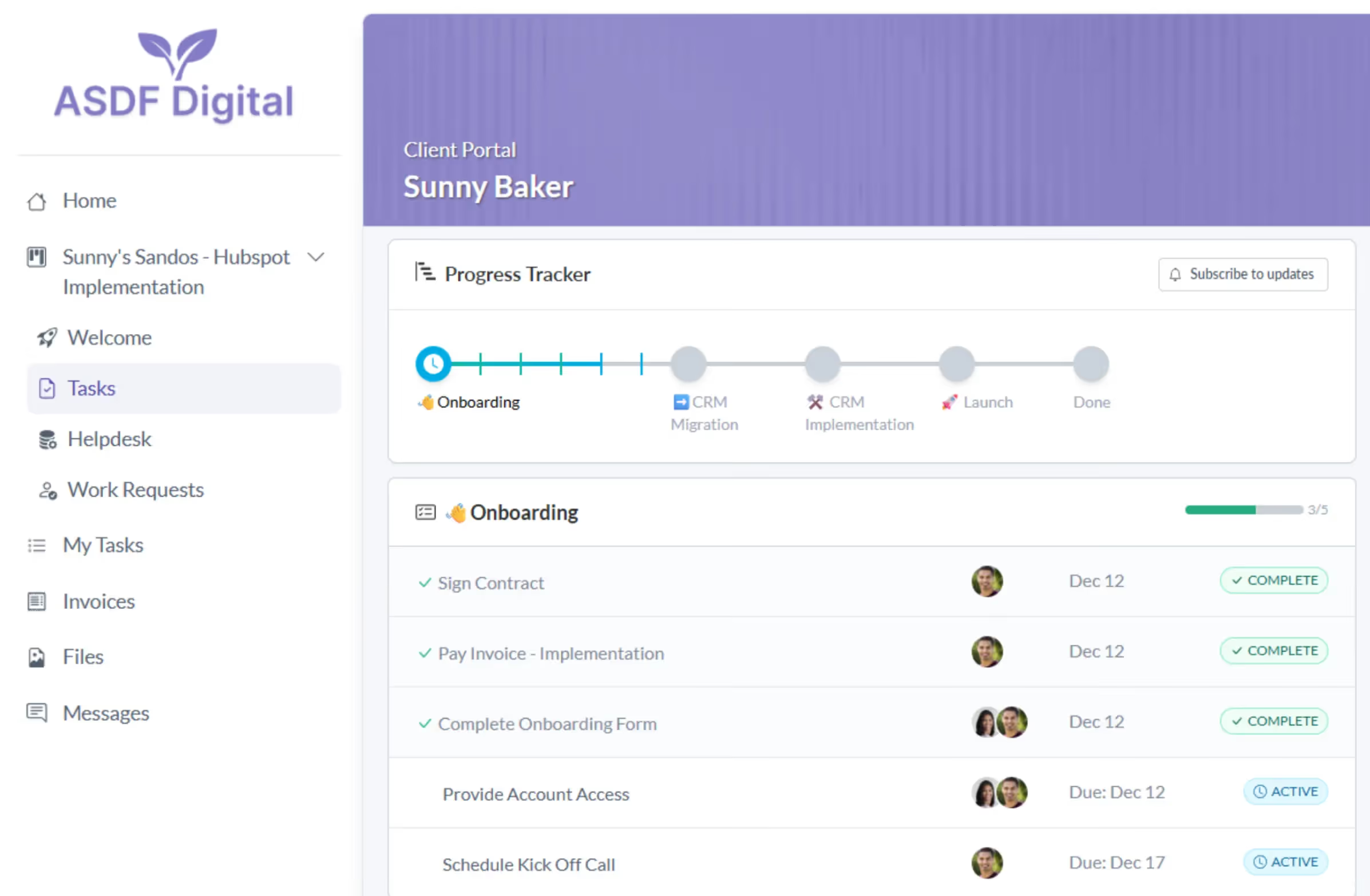
Because everything is organized in one place, clients always know where to go and what to do next. There’s no reliance on “checking your inbox,” no lost links, and no context switching between tools.
👉 Why this scales: Instead of managing fragmented communication across tools, your clients work from one unified view that keeps progress visible and urgent steps front of mind.
#2. Automate Task Coordination and Follow-ups
One of the biggest reasons onboarding slows down is manual coordination. Teams have to waste hours sending reminder emails and following up on tasks that should have been completed days ago.
Client onboarding platforms remove that burden by automating this.
In LaunchBay, for example, tasks are:
- Assigned to the right owner (client or internal team)
- Given clear due dates
- Automatically followed up on if they’re overdue
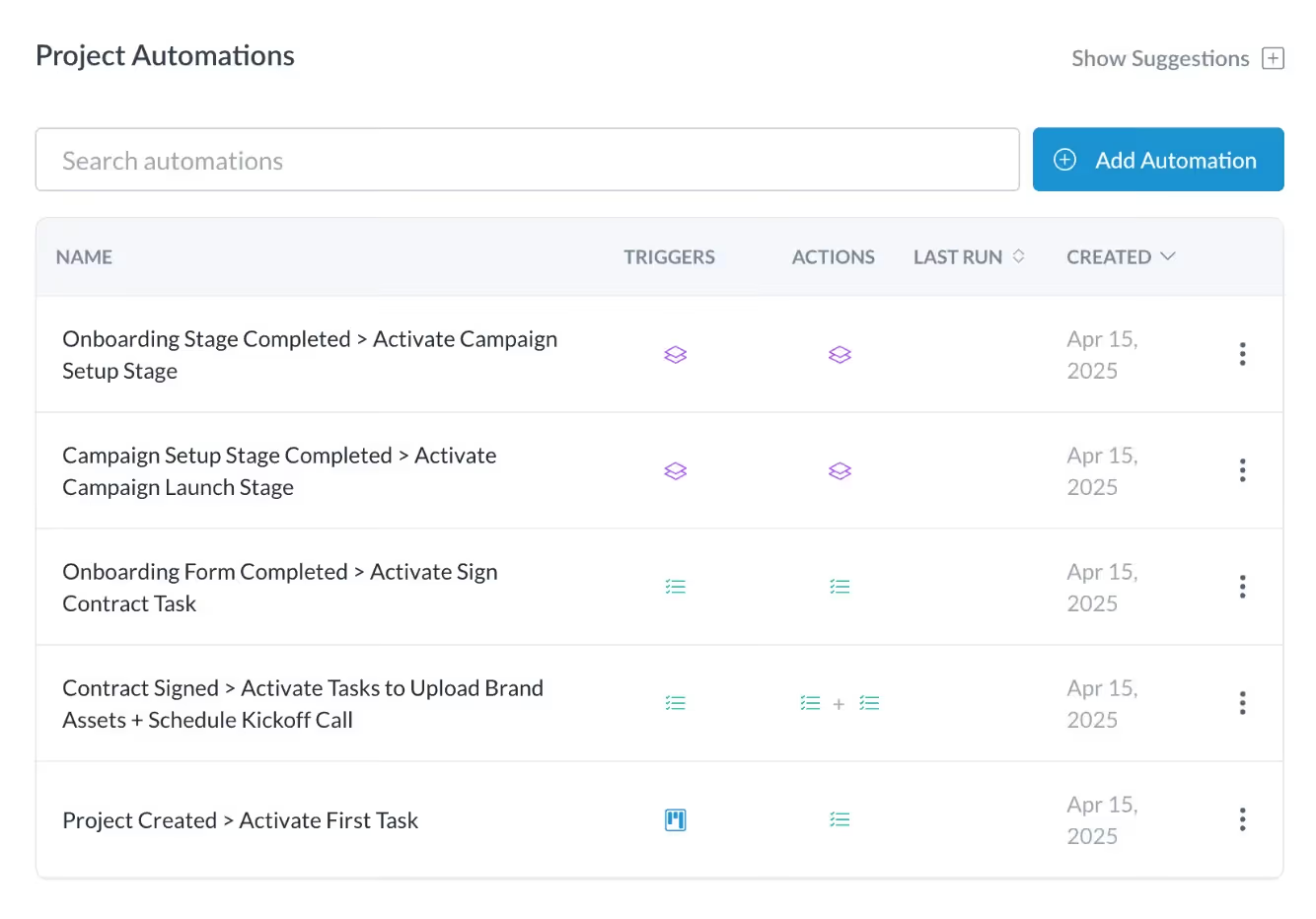
Instead of relying on someone on your team to nudge a client, the system handles reminders and status updates automatically. As tasks are completed, the onboarding workflow updates in real time and triggers the next steps.
👉 Why this scales: When follow-ups and task progression are automated, onboarding no longer depends on manual oversight. Your team can manage more clients at once without spending more time chasing tasks or hiring additional coordinators.
#3. Bring Forms, Files, and Approvals Into One System
Most teams already use tools to handle different parts of onboarding. For example, you might use Google Forms for your intake forms or DocuSign to send contracts.
Individually, these tools work fine. The problem is that onboarding gets spread across all of them.
A client onboarding platform like LaunchBay doesn’t force teams to abandon their stack. Instead, it integrates tools into a single platform, keeping everything coordinated in one place.
In LaunchBay, teams can:
- Embed or link external forms (like Google Forms or Typeform) directly into onboarding tasks
- Collect file uploads inside the client portal, or link out to existing Drive/Dropbox folders when needed
- Include contract signing steps as part of the onboarding flow, whether handled natively or via external signature tools
- Trigger follow-up steps automatically once a form is submitted, a file is uploaded, or a document is signed
From the client’s perspective, onboarding will still feel simple: one portal, one task list, one place to work.
👉 Why this scales: When forms, files, and approvals are unified into one workflow, teams spend less time coordinating across tools and more time moving clients toward first value.
🔗 Related: How to Share Files with Clients Without Logins or Email Chains
#4. Make Onboarding Progress Visible to Everyone
When onboarding is managed across email threads, spreadsheets, and internal tools, no one has a complete picture. For example:
- Sales doesn’t know what’s been completed post-handoff
- Delivery isn’t sure what they’re still waiting on from the client
- Clients don’t know what’s blocking progress or what comes next
A client onboarding platform solves this by making progress visible by default.
LaunchBay solves this with a project progress tracker that gives both your team and your clients a real-time view of onboarding status.
🔗 Related: The 5 Best Client-Facing Project Progress Trackers for Agencies
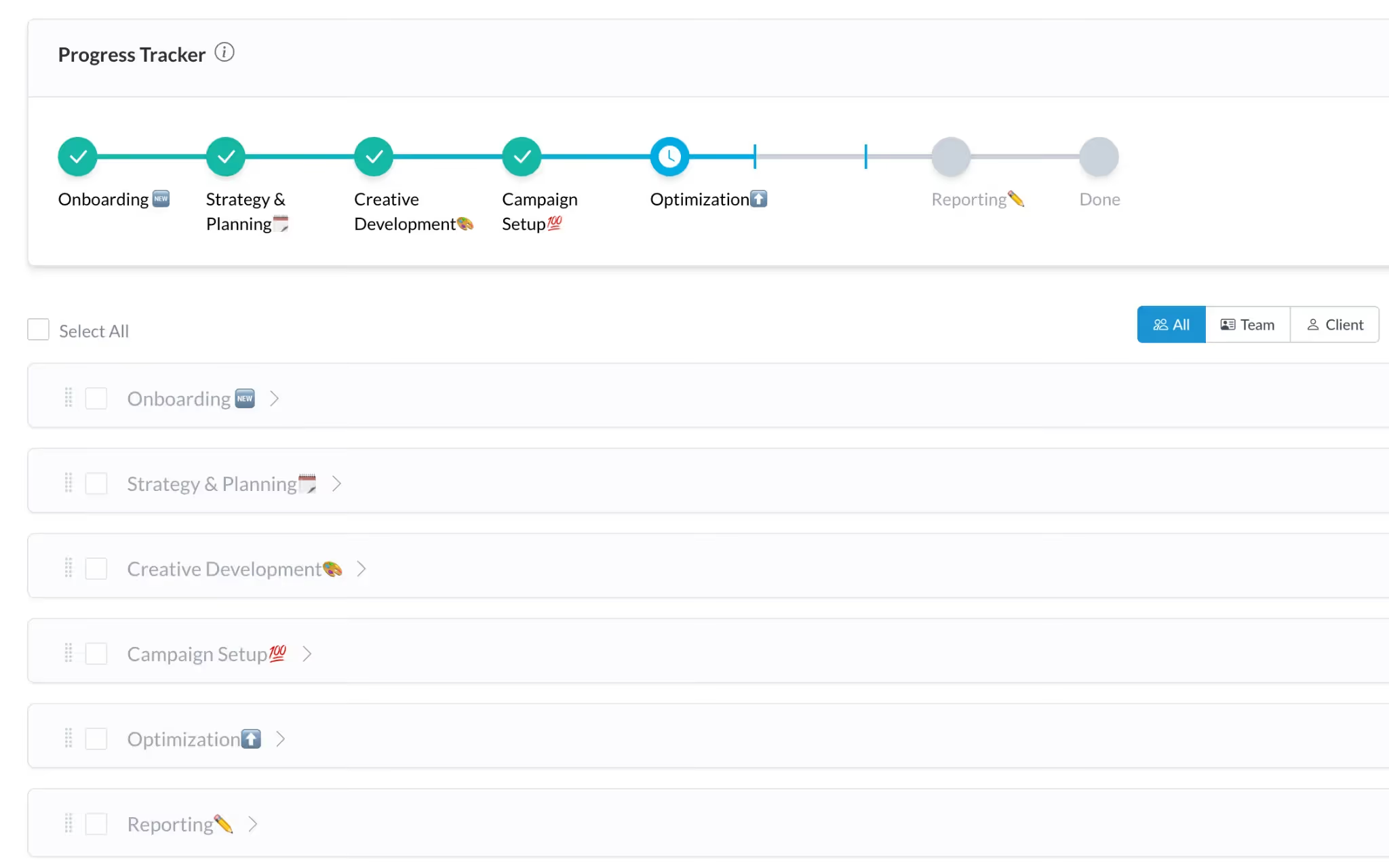
You can see:
- What’s completed vs. what’s still outstanding
Every onboarding project shows task-level status, so there’s no ambiguity about what’s done and what’s blocking progress. - How close each client is to completion
Progress indicators give a high-level view of onboarding status, helping teams manage multiple onboarding projects at once.
LaunchBay also offers project progress reporting across all onboarding projects created from templates, allowing teams to see patterns and bottlenecks across their entire onboarding pipeline.
👉 Why this scales: Clear visibility reduces onboarding delays that lead to early churn. Teams stay ahead of blockers, clients reach first value faster, and revenue becomes more predictable as volume grows.
#5. Standardize the Core While Personalizing the Client Experience
Scalable onboarding doesn’t mean one rigid process for everyone. It means standardizing the core operational steps that should remain the same while allowing personalization where it matters.
Client onboarding platforms like LaunchBay do both by combining repeatable templates and automations with customized client touchpoints.
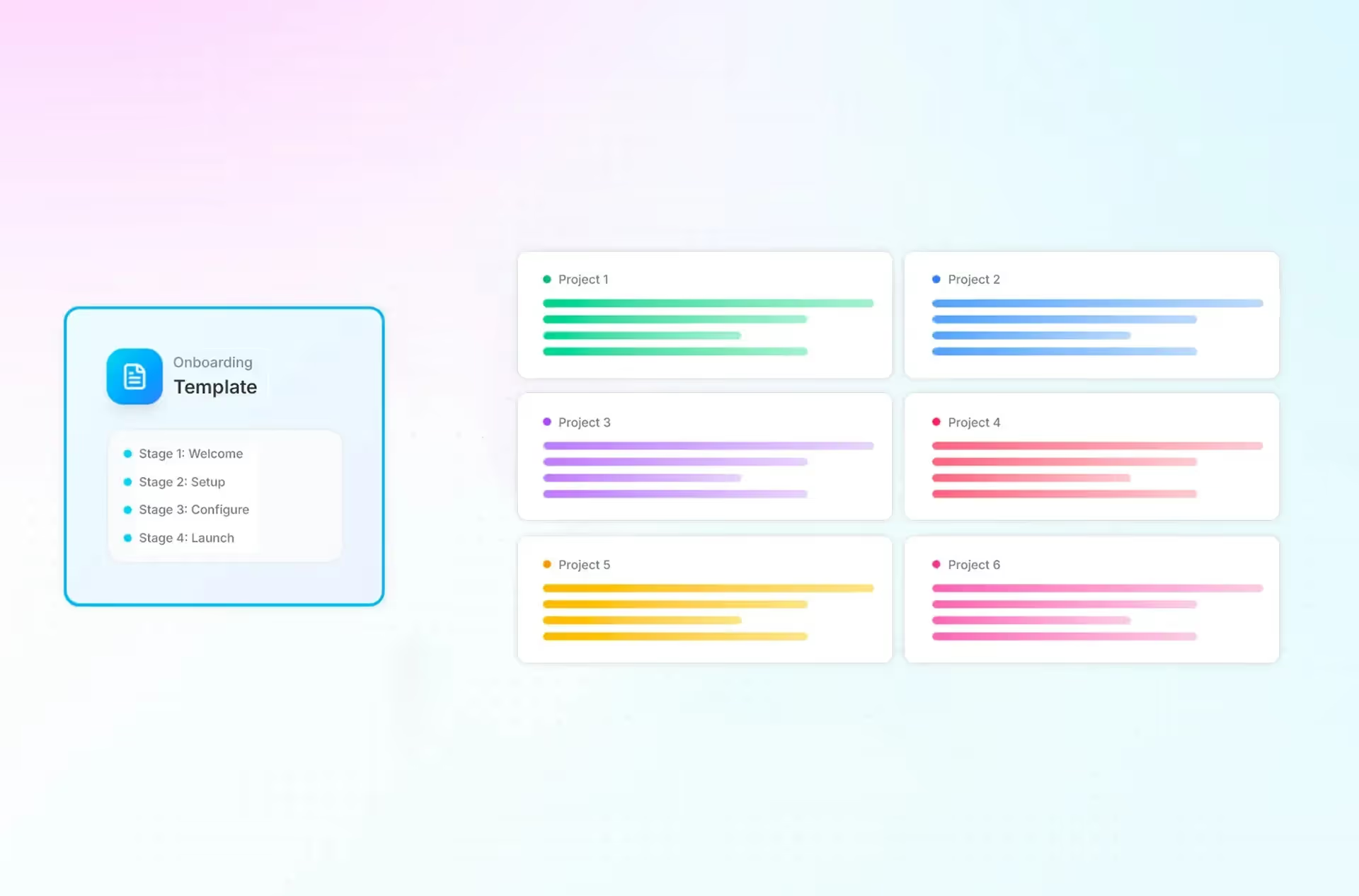
With LaunchBay, you can:
- Use reusable onboarding templates to standardize core steps (task sequences, stages, ownership) across every client.
- Collect information through conditional forms so clients see only questions relevant to their situation.
- Deliver onboarding through fully branded, loginless portals that feel custom to each client.
- Personalize task descriptions, welcome messages, and reminders with client-specific context, without changing the underlying workflow.
- Trigger onboarding automatically from other tools (like CRMs), so projects start with the right context from day one.
👉 Why this scales: You stop rebuilding onboarding from scratch for every client. The process stays consistent, while the experience still feels tailored, allowing teams to onboard more clients without adding complexity or headcount.
#6. Use AI to Build and Test Onboarding Workflows
As teams grow, the work of designing onboarding workflows can itself become a bottleneck. Writing tasks, stages, and automation rules by hand every time eats into the same admin time you’re trying to save.
Client onboarding platforms such as LaunchBay are already adding AI-driven workflow tools to accelerate this process.
With LaunchBay, you can:
- Generate onboarding workflows from SOPs
Use an AI Task Builder to generate a complete onboarding template from your existing SOPs without building everything from scratch. - Test workflows before rolling them out
Simulate onboarding flows with “AI clients” to spot missing steps, unclear instructions, or potential bottlenecks before clients ever see them. - Continuously improve workflows using real data
Reporting highlights where clients stall or tasks repeatedly fall behind, making it easier to refine workflows over time.
👉 Why this scales: AI turns onboarding workflows into systems you can create, test, and improve faster.
How Scalable Client Onboarding Looks Across Different B2B Teams
While the fundamentals of onboarding are the same, how scalable onboarding looks in practice varies by team and business model.
A good client onboarding platform should be flexible enough to adapt to different industries, workflows, and team structures.
Client onboarding for software companies
For B2B software companies, onboarding often falls apart between sales handoff and implementation.
❌ Common issues include:
- Sales context lost during handoff to implementation or customer success
- Setup and access collected through emails and kickoff calls
- Customers getting stuck before completing initial configuration
- Early churn happening before the product proves ROI
A client onboarding platform changes this by giving software teams a shared, repeatable system.
✅ With a client onboarding platform, software teams can:
- Standardize sales → implementation handoffs so context isn’t lost
- Collect setup requirements, access, and technical details in one flow
- Track onboarding progress across customers, not one-off projects
- Reduce time-to-first-value without adding more customer success headcount
🔎 Example:
Rocketstay, a hotel revenue management company, used LaunchBay to cut onboarding time from ~10 days to ~3 days and reduce onboarding workload from multiple people to one, turning onboarding into a predictable, repeatable process instead of a bottleneck.
Client onboarding for digital marketing agencies
For many marketing agencies, the biggest onboarding bottleneck is collecting the information they need from clients.
Assets, approvals, and account access often arrive late, require repeated follow-ups, and create hours of manual work before delivery can even begin.
❌ Common issues include:
- Waiting on clients for assets, approvals, and ad account access
- Onboarding spread across email, Google Docs, and project tools
- Campaign timelines slipping before the first deliverable launches
- Teams spending more time chasing information than doing billable work
A client onboarding platform gives agencies a single system to manage client-dependent work without constant follow-ups.
✅ With a client onboarding platform, agencies can:
- Centralize intake forms, asset uploads, and approvals in one client portal
- Automatically assign and remind clients of required onboarding tasks
- Track progress across multiple client onboarding processes at once
- Reduce non-billable admin work without sacrificing a high-touch experience
🔎 Example:
Sites at Scale, a digital marketing agency, used LaunchBay to turn onboarding into an asynchronous, self-serve process. Centralizing client tasks in a single portal has reduced follow-ups and now saves the team 15 hours per week, while making it easier for clients to submit information without delays.
🔗 Related: How to Use Client Onboarding Software to Manage Digital Advertising Campaigns
Client onboarding for CRM implementation teams
For CRM and RevOps implementation teams, onboarding is part of the deliverable. If it feels manual or disorganized, it undermines the automation expertise clients are paying for.
❌ Common issues include:
- Delays collecting access, data exports, and technical requirements
- Context lost between sales and implementation handoff
- Onboarding tasks scattered across emails, docs, and project tools
- Clients asking for status updates because progress isn’t visible
✅ With a client onboarding platform, implementation teams can:
- Standardize how requirements, credentials, and approvals are collected
- Preserve context from sales through delivery
- Give clients a clear view of onboarding progress and ownership
- Reduce coordination work without locking teams into rigid workflows
Onboard Smarter and Scale Faster with LaunchBay
If you’re a B2B business trying to scale onboarding, spreadsheets and manual follow-ups won’t cut it.
To make onboarding scalable, you need the right system behind it. And in 2026, that system is a client onboarding platform.
LaunchBay is a client onboarding software built specifically for B2B software and service businesses. It helps you replace scattered emails, spreadsheets, and manual follow-ups with one centralized workspace—automating the busywork so your team can focus on delivering value.
Here’s why B2B teams choose LaunchBay:
✅ Centralized client experience — keep all files, forms, and messages in one branded portal.
✅ Built for both clients and internal teams — clearly manage client-owned tasks alongside internal work in a single system.
✅ Automated follow-ups & reminders — never chase a client for missing info again.
✅ Templates for repeatable success — standardize your workflows while personalizing the client experience.
✅ Real-time visibility — see exactly where every client stands and where delays occur.
✅ White-labeled & secure — your brand stays front and center, with enterprise-grade protection.
Ready to fix your B2B client onboarding?
👉 Try LaunchBay for free


Take command of every customer onboarding.
One platform to run, monitor, and manage every customer onboarding, with full visibility into every account.
Ready to stop wondering where things stand?