.svg)
October 15, 2026
Client portal forms got a makeover
.avif)
Part of our 31 Customer Improvements series, where we ship one feature our customers asked for every day this month.
Your clients fill out forms in your client portal constantly: intake questionnaires, onboarding checklists, approvals. For many of them, a form is the first real task of client onboarding, so it should feel easy.
We’ve redesigned how those forms look and feel. You don’t need to change anything, because your existing forms update automatically.
Matches your brand
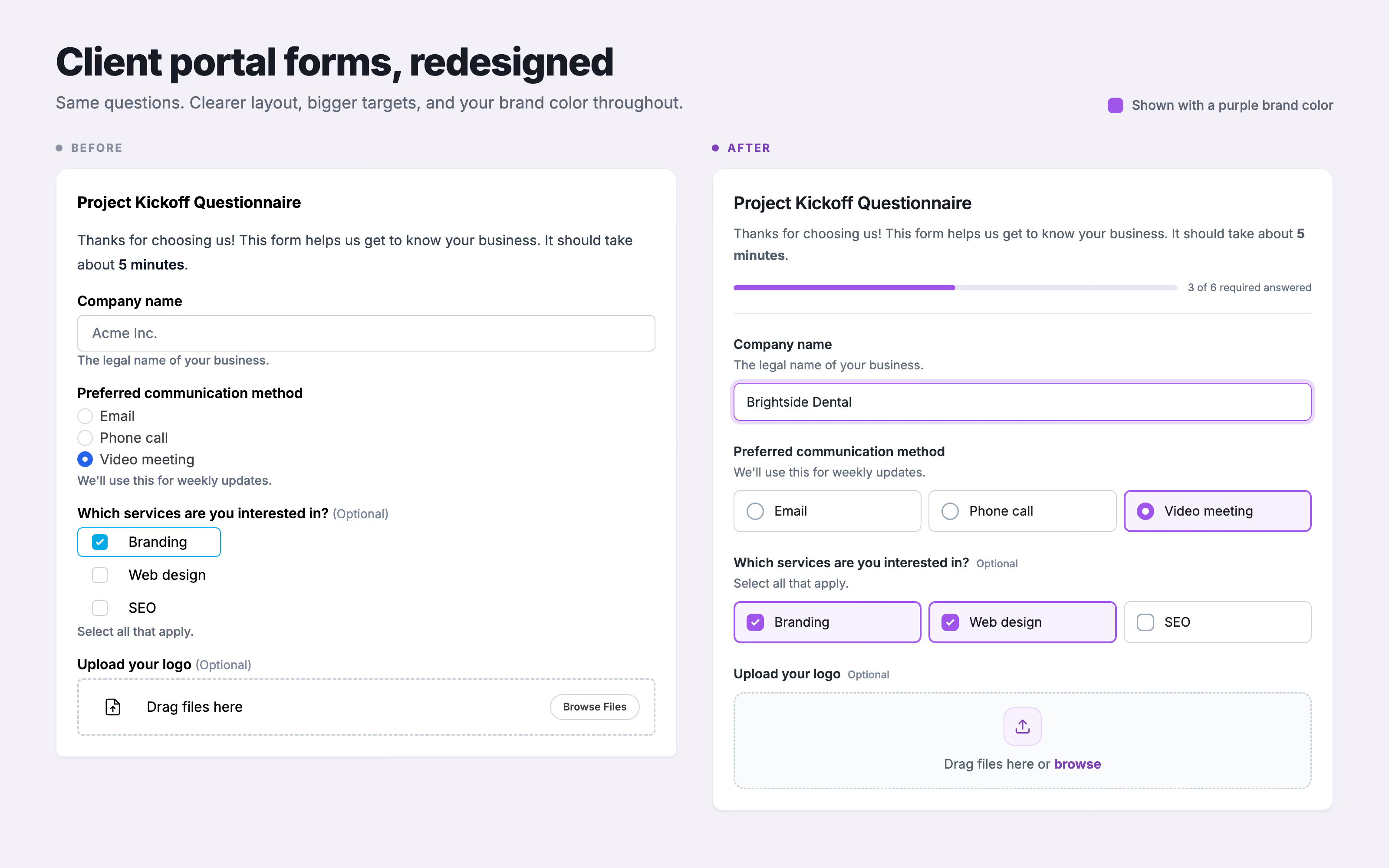
Your brand color, built in. Selected options, focus outlines, the progress bar, and the upload area all use your portal’s primary color. Forms now match the rest of your branded portal instead of a default blue.
Easier to fill out
- Answers that are easier to tap. Multiple-choice and checkbox options are now large tiles in a tidy grid. Clients can click anywhere on an option to select it, and the selected choice is easy to spot.
- Hints before the question, not after. Help text now sits right under each question, so clients read it before they start typing.
- A sense of progress. Forms with three or more required questions show how many have been answered, so long questionnaires feel finite.
- Clearer errors. If something’s missing, the field is outlined in red, with a short message right beneath it.
- More room to breathe. Questions have more space between them, fields are taller, and short answers like email, number, and date get appropriately sized inputs.
- Repeatable sections that make sense. When clients add multiple entries, like stakeholders or locations for a client implementation, each one is numbered and has its own remove button. “Add another” is now a clear button.
Works great on phones
Options stack into a single column on small screens, so clients can finish a questionnaire from their phone without pinching and zooming. It builds on the mobile improvements in our simpler client portal update.
Available now
Same questions and the same answers, just a nicer experience for your clients. Open any form in your portal, or use Preview portal, to see it.
Have an idea for the next improvement? Reply to any of our emails or send it through the in-app chat. That’s how this one got built.

