.svg)
A Welcome Message on Your Client Portal Home
.png)
Part of our 31 Customer Requests in 31 Days series, where we ship one feature our customers asked for every day this month.
A client's first login matters. It's when they decide whether your portal is where the work happens, or one more link they'll ignore until you chase them by email.
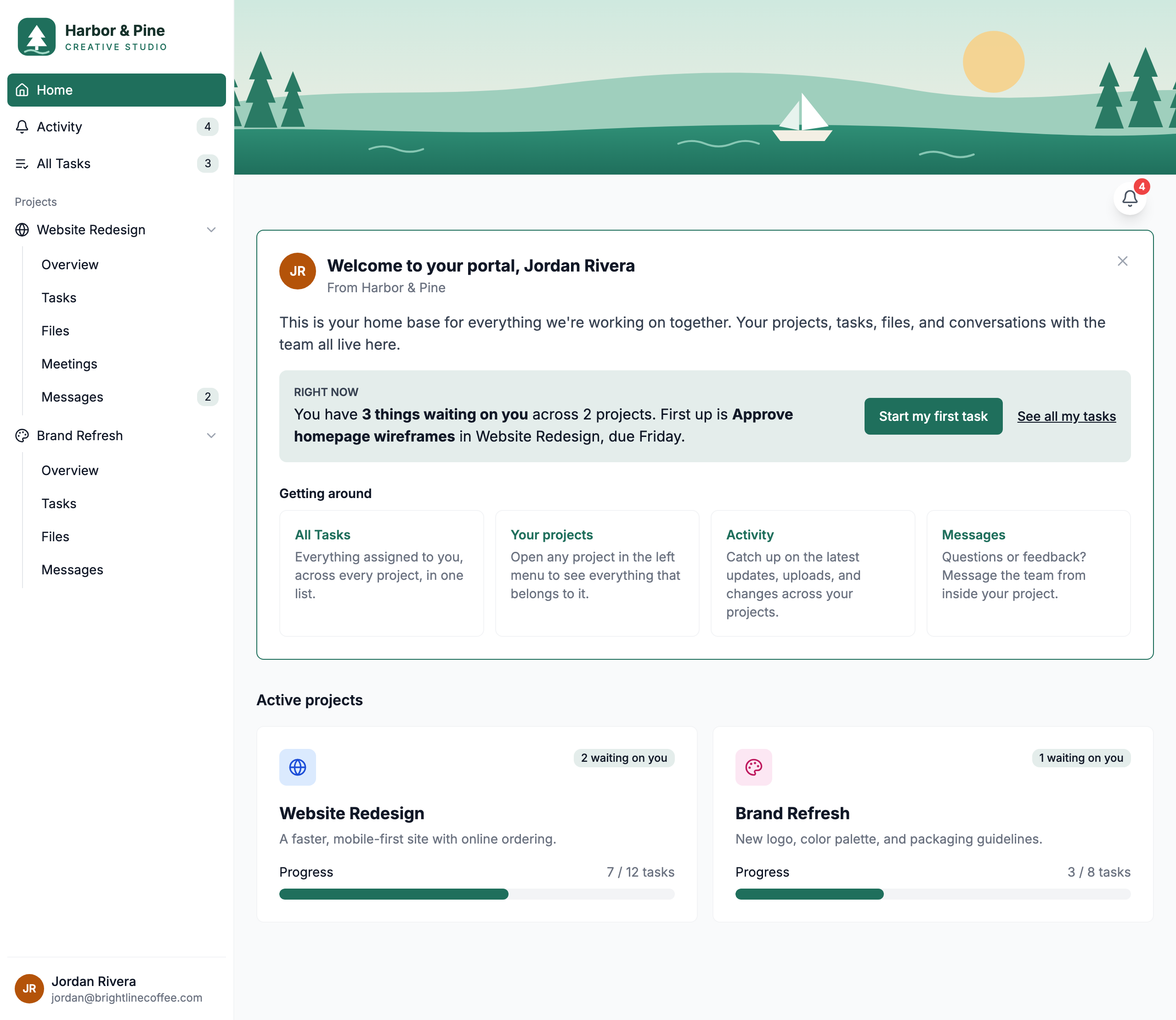
For a while, a first-time client landed on a grid of project cards with no introduction. Many of you told us the same thing: "My clients don't know where to start." So starting today, the client portal home page opens with a welcome message that shows clients around and tells them what needs their attention right now.
The new welcome message at the top of the client portal home page
What your clients see
The welcome message sits at the top of the portal home page, above Active projects. It has three parts:
1. A welcome from your team. A greeting with the client's name, signed with your team's name, plus a short note: this is their home base for projects, tasks, files, and conversations with your team.
2. A "Right now" panel. One sentence about what's waiting on them to do:
- "You have 3 things waiting on you across 2 projects. First up is Upload your logo files in Website Redesign, due Friday."
- If nothing is assigned yet: "Nothing needs your attention yet. The team will let you know when there's something for you to review."
- If their projects aren't live yet: "Your team is getting things ready. Your projects will show up here as soon as they're live."
When there's a task to do, a Start my first task button takes them straight to it.
3. "Getting around" tiles. Quick links to All Tasks, Your projects, Activity, and Messages. The Messages tile only appears if your portal has messaging turned on.
Plus two smaller things
- "Waiting on you" on every project card. Each Active projects card now shows how many open tasks are assigned to the client in that project, like "2 waiting on you". The existing progress bar stays the same.
- A task count on All Tasks. The sidebar's All Tasks item now shows the client's total open tasks
Out of the way when they're done with it
Once a client dismisses the welcome message, it's gone for good on every device they use. When you preview the portal as a client, you'll see exactly what they see, and dismissing it in a preview won't hide it for them.
Available now
The welcome message is live on every client portal today. There's nothing to set up. Log in as a client (or use Preview portal) to see it.
Have an idea for the next feature? Reply to any of our emails or send it through the in-app chat. That's how this one got built.

